Six months ago, your team demoed an AI assistant that summarized customer contracts in seconds. Everyone who saw the demonstration was impressed. Today, however, the assistant remains in a test environment that nobody uses. Legal has questions about the data it accesses; the contract repository contains three conflicting versions of each contract, and the analyst who built it has been reassigned to another project.
If this sounds familiar, you’re not alone. In PwC’s 29th Global CEO Survey (January 2026), 56% of the 4,454 CEOs surveyed said AI had brought their companies neither higher revenue nor lower costs. The models usually work. What fails is the organization around them: unclear goals, untrusted data, systems that cannot exchange information, missing governance rules, and teams with no training.
These gaps often emerge early, well before a project stalls, if you know what to look for. Before you start preparing your business for AI, it helps to know which of these gaps you have. Below are the seven warning signs we see most often in enterprise AI programs. For each sign, you’ll see what it costs you and what to fix first. After that, we lay out the order to tackle them in.
Key Takeaways
- Only about 5% of enterprise generative AI pilots drive rapid revenue gains, and the cause is usually organizational readiness, not model quality.
- Start with a clearly defined business problem and measurable KPIs instead of investing in AI tools without a specific objective.
- Poor data quality, disconnected systems, and undocumented information are major barriers to scaling AI beyond pilot projects.
- Clear AI ownership, governance policies, data security controls, and human oversight are essential for responsible AI implementation.
- Employee resistance and limited AI skills can slow adoption, making role-based training and employee involvement critical to success.
- AI readiness should be built one use case at a time. Prioritize high-impact projects, address their specific requirements, measure results, and gradually scale AI adoption across the organization.
Why Do AI Readiness Gaps Stay Hidden?
Most readiness problems are invisible from the boardroom. Budgets get approved, and pilots get built. The gaps surface only when a project tries to go live.
The research shows how often that happens. MIT NANDA’s The GenAI Divide: State of AI in Business 2025 drew on 150 leader interviews, a survey of 350 employees, and 300 public AI deployments. It found that only about 5% of enterprise generative AI pilots achieved rapid revenue acceleration. IDC’s 2024 Future Enterprise Resiliency and Spending survey found that Asia/Pacific organizations ran an average of 24 generative AI pilots in 12 months, and only 3 reached production.
Model quality is rarely the problem. The real blockers are AI adoption challenges inside the organization, and leaders tend to underestimate them. In Precisely and Drexel LeBow’s 2026 State of Data Integrity and AI Readiness report, close to 9 in 10 leaders rated each of their core areas (e.g., data, technology, skills) as ready for AI. In the same survey, roughly 4 in 10 named those same areas as a top obstacle.
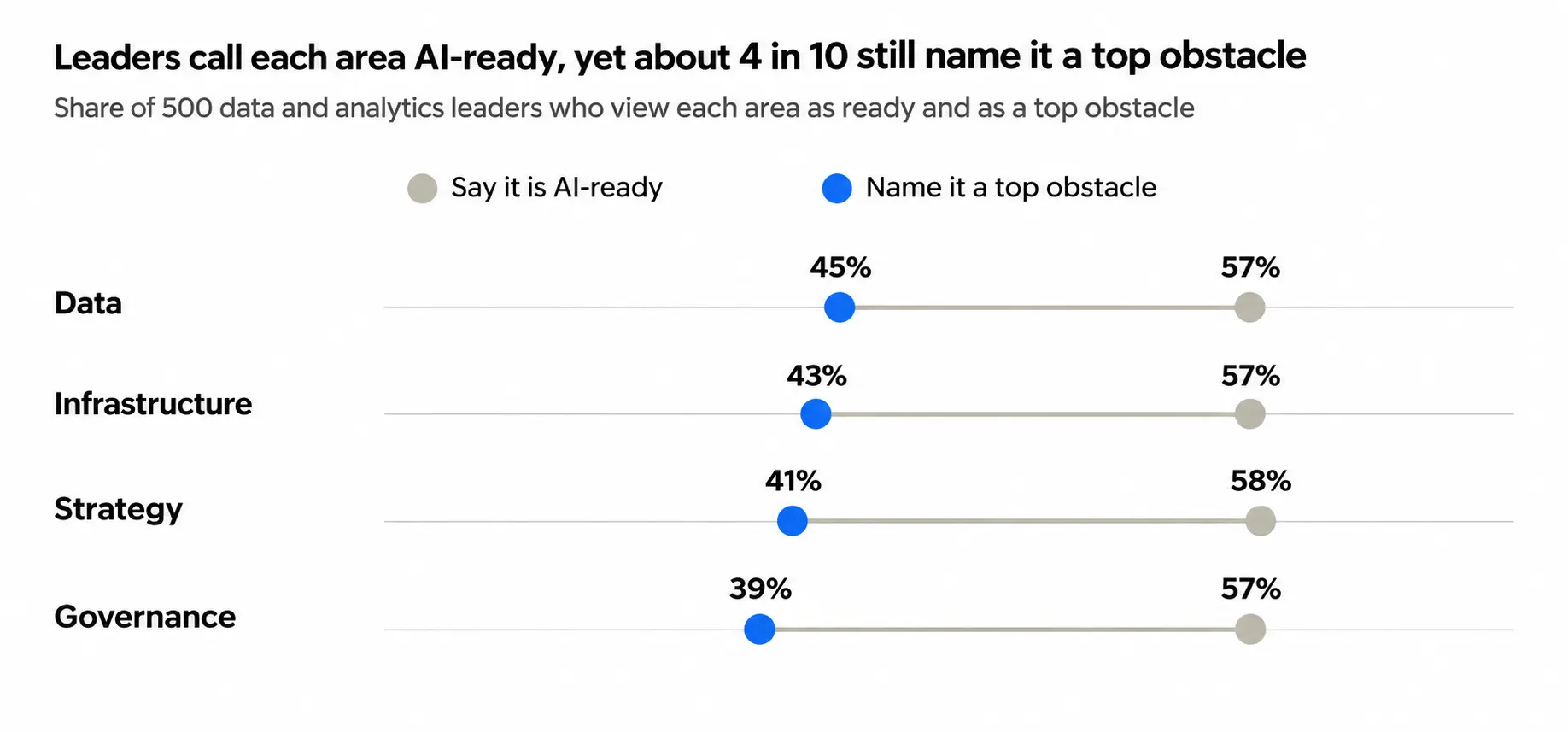
For data specifically, that 4-in-10 figure reflects leaders who named data readiness as the biggest barrier to aligning AI with business goals. Readiness is usually judged in planning meetings, while obstacles appear in delivery, when a pilot meets real data, real users, and a compliance review. That timing explains why AI projects fail to scale as often as they do.
Insight: Treat your own readiness rating as a hypothesis. Test it against one live use case before you commit budget to a wider rollout.
7 Signs Your Company Isn’t Ready for AI
None of these signs mean you should stop. Each one points to a specific fix, and most companies show three or four of them at once. Use them as a diagnostic, and then apply the fix order described later in this guide.
1. You’re Shopping for AI Tools Before You’ve Named a Business Problem
It usually starts with a vendor demo or a board member asking about the AI plan. Within weeks, there is a shortlist of platforms. However, nobody has written down which process will change, by how much, or how anyone will know it worked.
This matters because a project without a baseline can never prove ROI. The Precisely and Drexel LeBow study found that only 31% of organizations have well-established AI metrics tied to business KPIs. Without that link, every budget review becomes a debate about opinions.
The fix is disciplined use case prioritization. Score each candidate on business impact and on the effort and readiness work it needs. Then plot them on a simple impact-versus-effort matrix and start with the high-impact, low-effort candidates.
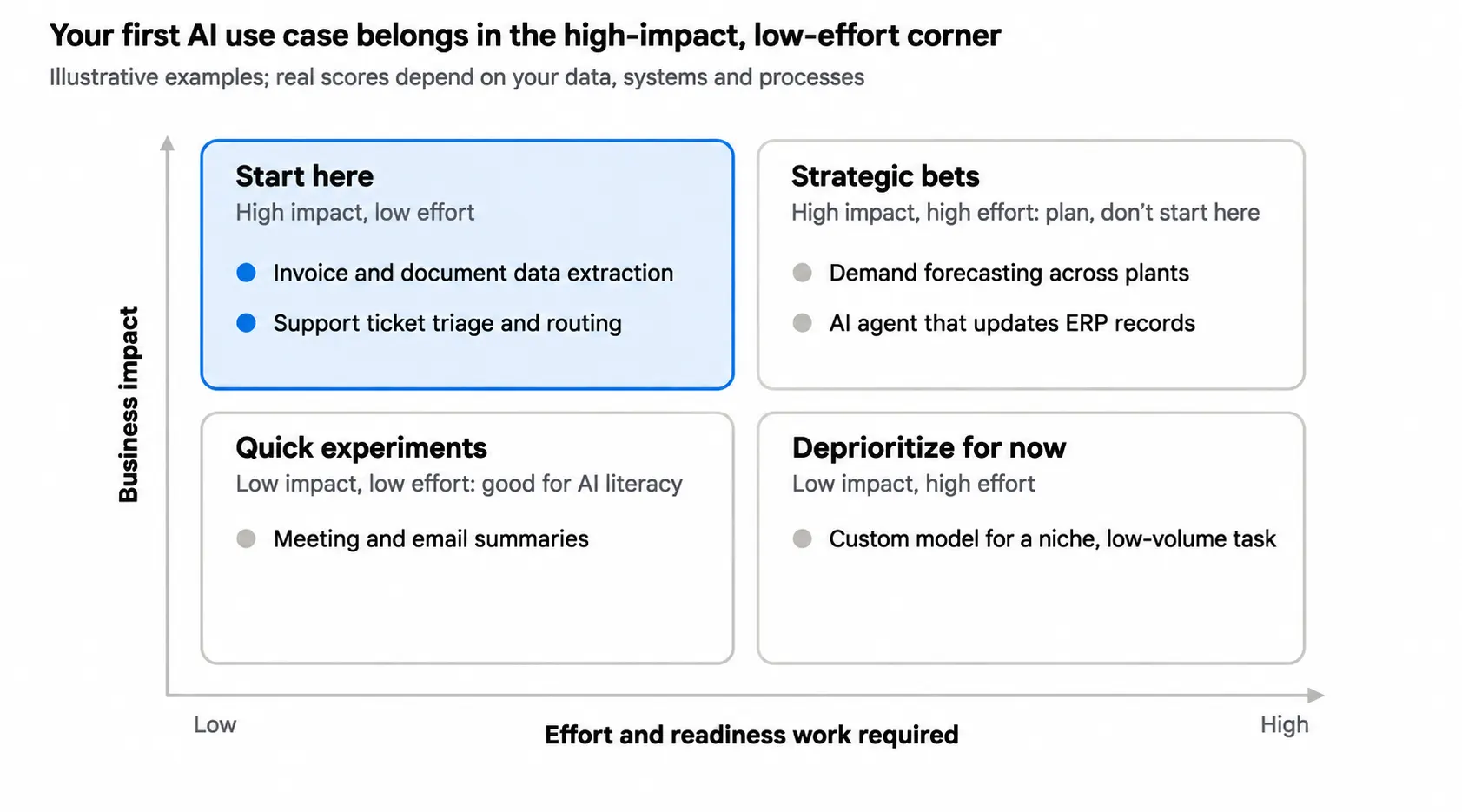
Back-office work is a sensible place to look first. MIT NANDA found the biggest returns in back-office automation, even though more than half of generative AI budgets went to sales and marketing tools.
2. Your AI Pilots Never Make It to Production
A stalled pilot rarely announces itself. It just lingers, never quite dead and never moving forward. Common symptoms include:
- The model runs in a test environment on a one-time copy of the data.
- No budget exists for hosting, monitoring, or retraining after launch.
- Success was defined as a working demo, with no business metric attached.
- The person who built it has no counterpart in operations who can take over responsibility for it.
The pilot-to-production gap is where most AI spending produces no return. A production system needs deployment pipelines, monitoring for model drift and data quality, cost controls, and a named owner who is responsible when something fails. Those are MLOps disciplines, and they are rarely scoped at the pilot stage. Our MLOps services team sees this pattern more than any other.
How you build also matters. In the MIT NANDA research, solutions bought from specialized vendors or built with partners succeeded about 67% of the time, while internal builds succeeded about one-third as often.
3. Nobody Owns AI Results
Ask who is accountable for the return on your AI spend and watch what happens. IT names the business, the business names IT, and the innovation team says it only runs experiments.
The split is common. CIO.com’s State of the CIO 2025 research (906 IT leaders, May 2025) found that 80% of IT leaders say the CIO leads the evaluation of new AI technology, while 71% say IT relies on business counterparts to drive adoption. One group leads evaluation, and another group drives adoption, so nobody owns the outcome.
Clear ownership needs three roles, written down:
- A business sponsor who owns the metric the use case is meant to move and signs off on go-live.
- A technical lead who owns the build, the integration, and the production support model.
- A small AI council of IT, data, security, legal, and business leaders that approves or rejects new use cases against agreed criteria.
4. Your Data Is Scattered, Undocumented, or Untrusted
This is the sign most leaders already suspect. Customer records live in three systems, each with a different spelling of the same name. Key definitions, such as what counts as an active account, differ by department. And a lot of operational knowledge lives only in people’s heads. An internal AI assistant can only answer from what exists in a system it can read.
AI-ready data does not have to be perfect across the enterprise. It has to be accurate and complete enough for one specific use case, documented so people and models know what each field means, and current and accessible under clear permissions.
Governance makes a measurable difference to trust. In the Precisely and Drexel LeBow study, 71% of organizations with a data governance program reported high or very high trust in their data, compared with 50% of those without one.
If you’re working out how to prepare your data for AI, start with the data your first use case touches:
- Inventory the sources, owners, and refresh cycles for that data.
- Fix quality problems at the source, including duplicates, missing values, and inconsistent formats.
- Document definitions and lineage so outputs can be traced back.
- Set access rules and strip sensitive fields the model does not need.
- Capture undocumented knowledge, such as process steps and policies, in a system the model can retrieve.
- Monitor quality after launch, because data drifts as the business changes.
Steps 1 and 2 usually surface most of the surprises, which is why our data analytics team starts there before any model work begins.
5. Your Core Systems Can’t Share Data With Each Other
Many enterprises run on platforms that predate modern APIs. Data moves between them in nightly batch files, email attachments, or manual re-keying. That approach works for monthly reporting. It does not work for AI, which needs timely data at the moment of a decision. It also rules out AI agents entirely, because an agent must read from and write to systems through controlled interfaces.
You rarely need to replace a core system to start. A practical sequence looks like this:
- Map every system your first use case reads from or writes to.
- Add an API or integration layer in front of the systems that lack one.
- Modernize in stages, beginning with the components that block the highest-value use cases.
Our guide to AI-assisted legacy modernization covers how to phase this work without disrupting operations.
6. You Have No AI Policy or Guardrails
Your employees are already using AI, whether you have approved it or not. Without a policy, they decide for themselves what company data goes into public chatbots. Legal and security then see a project for the first time a week before launch, and the review stops it.
Formal governance is still far from universal. The Precisely and Drexel LeBow study found that 63% of organizations have some form of AI governance in place, which leaves more than a third with none.
You do not need to invent a framework. The NIST AI Risk Management Framework organizes AI risk work into four functions (Govern, Map, Measure, and Manage) and is a sound starting point for any enterprise. Regional laws add their own duties on top, such as India’s Digital Personal Data Protection Act 2023 for personal data, and the EU AI Act’s risk-based obligations.
Put these minimum controls in place before your first launch:
- Publish an acceptable-use policy and a list of approved AI services.
- Define data classification rules that state what may and may not reach a model.
- Require human review for decisions that affect customers, money, or employees.
- Complete a risk review for every AI vendor and model.
- Keep an inventory of AI use cases, with an owner for each.
- Create an incident process for wrong, biased, or leaked outputs.
AI agents require stricter controls. An agent acts inside your systems, so it needs least-privilege permissions, a log of every action it takes, human approval for high-impact steps, and a way to shut it down immediately.
7. Your Team Is Wary of AI or Doesn’t Know How to Use It
This sign shows up in usage data. Licenses are purchased, but few people log in. Managers keep old manual steps running alongside the new system as a fallback. Some staff privately worry that helping AI succeed puts their own roles at risk.
The skills gap is real and wide. In PwC’s 2025 Workforce Hopes and Fears Survey, only 14% of workers said they use generative AI daily. Among data leaders in the Precisely and Drexel LeBow study, just 38% said their organization is very prepared in AI skills and training.
Training alone rarely fixes this. AI change management treats adoption as a change to how work gets done. It involves users in design, redesigns workflows around the new system, and gives managers the time and incentives to lead the shift.
Build AI literacy by role, because each group needs something different:
| Role | What they need to learn |
| Executives | Where AI creates value in your business, what it costs, and which risks they own |
| Managers | How to redesign team workflows and set quality checks for AI outputs |
| Frontline staff | How to use approved tools on real tasks, verify outputs and escalate errors |
| Technical teams | Deployment, monitoring, security and cost management for AI in production |
The 7 Signs at a Glance: Root Cause and First Fix
Use this table as a working checklist with your leadership team. Mark which signs apply, then assign the first fix to the owner listed.
| Sign | Likely root cause | First fix | Who owns it |
| 1. Tools before problems | AI treated as a technology purchase | Pick one use case with a baseline metric and target | Business sponsor |
| 2. Pilots never ship | No production plan, budget, or MLOps | Scope run costs, monitoring, and an owner before the pilot starts | Technical lead |
| 3. Nobody owns results | Split accountability between IT and the business | Name a sponsor and set up a small AI council | Executive team |
| 4. Untrusted data | No shared definitions or data owners | Fix and document the data for the first use case only | Data owner |
| 5. Systems can’t share data | Legacy platforms without APIs | Add an integration layer for the systems that the use case needs | IT architecture |
| 6. No guardrails | Policy written after adoption began | Publish an acceptable-use policy and approved services list | Legal, risk and security |
| 7. Wary or untrained team | Training without workflow change | Involve users in design and train by role | Business managers and HR |
How Much Readiness Does Your First AI Project Need?
A first project needs less readiness than most leaders assume. Readiness belongs to a use case, not to the whole company. A team can safely launch a document-extraction workflow while its enterprise data platform is still being rebuilt, as long as the data that workflow uses is clean and governed.
The requirements do rise with autonomy. The more an AI system decides or acts on its own, the stronger your data, integration, and controls must be.
| Readiness area | Rules-based automation | Generative AI assistant | AI agent |
| Data | Structured fields in one system | Documented, current content the assistant can retrieve, with permissions respected | Accurate, real-time data across every system the agent touches |
| Integration | Read access to one or two systems | Read access to knowledge sources | Read and write access through governed APIs |
| Governance | Standard IT change control | Acceptable-use policy, output review, data rules | Least-privilege permissions, action logs, approval steps, immediate shutdown capability |
| People | Process owner trained on exceptions | Users trained to verify outputs | Operators who supervise actions and handle escalations |
| Human oversight | Spot checks | Review before outputs reach customers | Approval for high-impact actions |
If you are still unsure how much readiness your first project needs, take our AI readiness assessment to get a clear score across data, systems, people, and governance, along with next steps.
How to Prepare Your Business for AI Once You Spot These Signs
Trying to fix all seven signs at once is how readiness programs become two-year transformation plans with no working system. A sound AI implementation strategy fixes them in sequence, scoped to one use case, so each step produces something the next one needs.
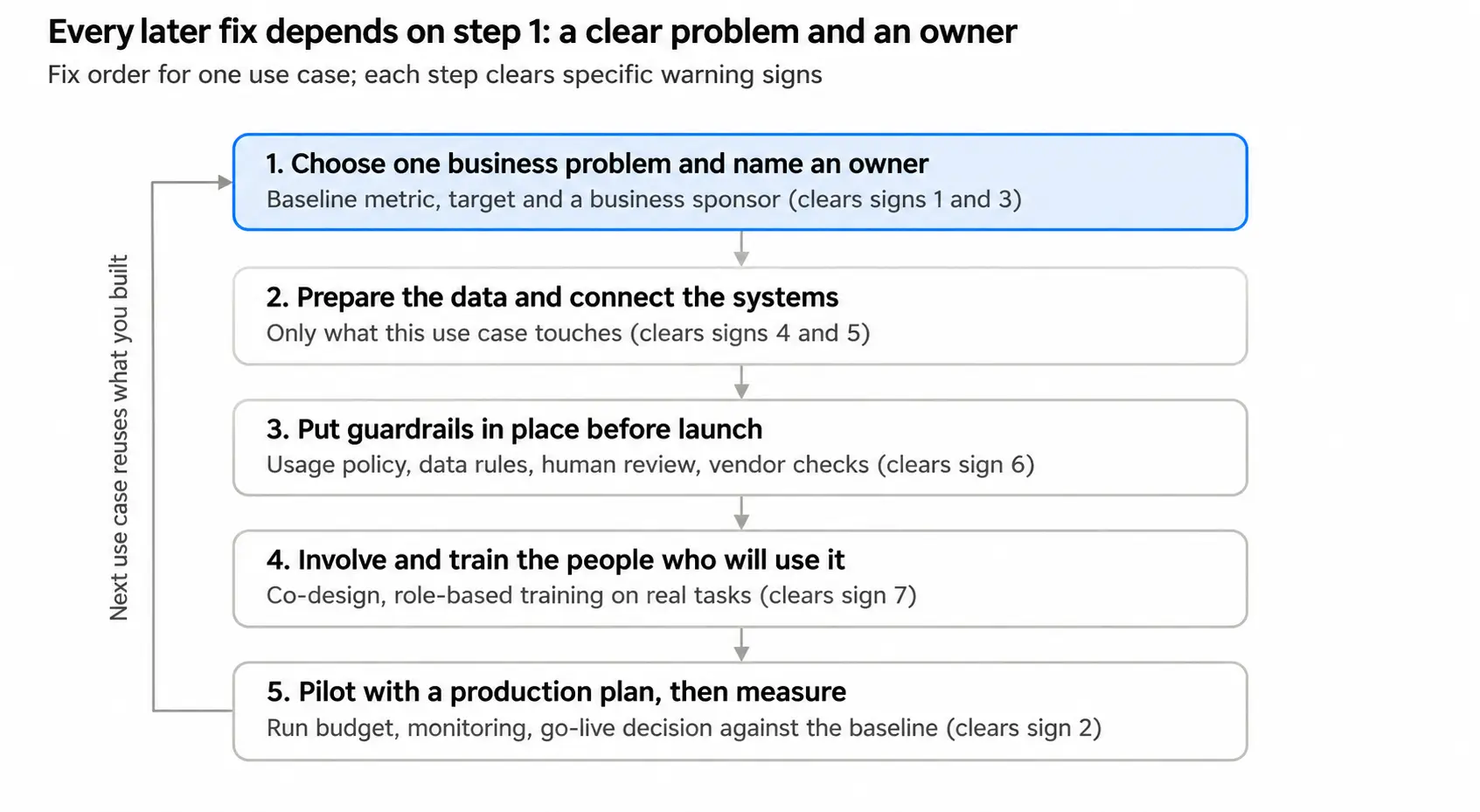
- Choose one business problem and name an owner: Use the prioritization matrix, record the baseline, and agree on the target.
- Prepare the data and connect the systems: Clean, document, and govern only the data that the use case touches. Add integration where a system blocks access.
- Put guardrails in place before launch: Publish the usage policy, data rules, and review thresholds, and run vendor risk checks. Bringing legal and security in at this stage avoids the late-stage veto.
- Involve and train the people who will use it: If you’re wondering how to prepare employees for AI, the practical answer is to let them help shape it. Recruit a few frontline users to co-design the workflow, train everyone on real tasks, and be candid about how roles will change.
- Pilot with a production plan, then measure: Agree on run costs, monitoring, and a go-live decision date before the pilot starts. Measure against the baseline and decide to scale, adjust, or stop.
The second use case costs less than the first, because the pipelines, controls, and trained people already exist. Turn the next three to five candidates from your matrix into an AI roadmap, ordered by impact and by how much of the first project’s preparation work each one reuses. Our AI consulting team helps clients build this sequence.
What Does Fixing These Gaps Cost, and How Long Does It Take?
The cost of getting ready depends far more on the state of your data and systems than on the AI itself. Model and license fees are usually the most predictable line in the budget. The surprises come from everything around them.
The main cost drivers are listed below, along with a way to contain each one:
- Data remediation: Cleaning, deduplicating, and documenting source data. Scoping it to the first use case keeps the cost limited.
- Integration: It includes building APIs or middleware for systems that cannot share data. It is often the largest single cost item when core platforms are old.
- Run costs: Hosting, inference, monitoring, and retraining continue after launch. This is the cost most pilot budgets leave out.
- Governance setup: This work covers policy drafting, risk reviews, and vendor assessments. It consists mostly of people’s time, and most of it occurs before launch.
- Training and change: Employees need time away from their regular work for training and co-design. Teams often underfund this item, and skipping it is expensive.
Spending before readiness can raise costs instead of cutting them. In PwC’s 2026 CEO Survey, 22% of CEOs said AI had increased their company’s costs over the previous 12 months, while 26% reported lower costs.
Timelines vary just as widely. A single, well-chosen use case on reasonably clean data can move from selection to a measured pilot within a quarter. Programs that begin with an enterprise-wide data cleanup take much longer, and many lose executive support before anything goes live.
How Do You Know You’re Getting AI Ready?
ROI takes time to show up. Leading indicators tell you much sooner whether the fixes are working. Review these with your AI council every quarter:
- Pilot delivery: Share of AI pilots that go live within the agreed window.
- Process coverage: Share of priority processes with documented steps and a named owner.
- Data quality score: Quality score of the datasets supporting active AI use cases.
- Training and adoption: Share of target users who complete role-based training and the number who use the system weekly.
- Idea-to-pilot time: Average time from idea submission to pilot approval through the AI council.
- Governance coverage: Share of AI use cases in the inventory with a named owner and a completed risk review.
For a full baseline across strategy, data, technology, people, and governance, use our 15-question AI readiness scorecard.
Conclusion
So, what if you recognized your company in several of these signs? Start with the use case that matters most instead of trying to fix everything at once. Identify the gaps in data, infrastructure, governance, and skills that could prevent that use case from succeeding, then assign owners and clear timelines to address them.
Choose one priority use case this quarter, prepare the systems and teams it needs, and run a focused pilot. Measure the results before expanding to other business functions. This approach helps you prepare your business for AI with fewer risks and a clearer path to measurable value.
If you’d rather not work through these gaps alone, SparxIT can help. Our AI consulting services team works with enterprises to assess readiness, strengthen AI foundations, and move priority use cases from planning to production. Talk to our AI team to identify where your organization should start.

Partner with Experts
Frequently Asked Questions
How long does it take to get a business ready for AI?


The time depends on scope. Preparing for one focused use case on reasonably clean data can take a quarter. Enterprise-wide readiness programs take much longer, which is why we recommend working one use case at a time.
Do we need perfect data before starting an AI project?
You do not need perfect data. You need accurate, documented, and properly governed data for the specific use case you’re building. Trying to perfect all enterprise data first delays results and often stalls the program.
Can a small business prepare for AI without a data team?
Yes, a small business can prepare for AI without a data team. Smaller companies can start with packaged AI services that work on data they already manage well, such as documents or support tickets. A clear owner, a usage policy, and an external integration partner can cover most early needs.
How do we support employees who are worried about AI?
Involve them early. Ask frontline staff to help design the workflow, train them on their real tasks, and be direct about how roles will change. Adoption improves when people help shape the system they will use.
How much does it cost to get a business ready for AI?
There is no standard figure. Costs depend mainly on data quality, the age of your core systems, and the scope of the first use case. Scoping readiness work to one use case is the most reliable way to keep costs predictable.