Most enterprises no longer debate whether to use generative AI. They debate why the pilots they funded last year are still not paying for themselves. A support chatbot answers questions but misses edge cases. A drafting assistant saves some teams minutes but creates rework for others. Finance asks for the business case, and nobody has a baseline to compare against.
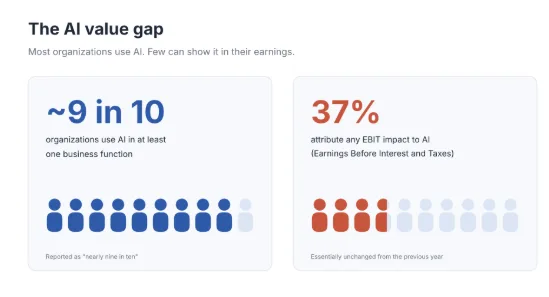
The gap shows up in the data. In McKinsey’s August 2026 survey, nearly nine in ten organizations use AI in at least one function, yet only 37% attribute any EBIT (Earnings Before Interest and Taxes) impact to it.
Today, the challenge of generative AI for business leaders has shifted from model access to choosing the right workflow, wiring the model into real systems, controlling risk, and proving value with numbers a CFO will accept.
This guide covers what generative AI for business looks like in practice in 2026, where it pays off, what it costs, how to implement it in 90 days, and how to measure the return.
Key Takeaways
- Value comes from one well-chosen workflow with a measured baseline, not from broad tool rollouts.
- The strongest early returns sit in customer support, software engineering, and knowledge retrieval, where controlled studies show 14% to 55% productivity gains.
- Most enterprise deployments should start with an existing model grounded in company data, then customize only when evaluation results justify it.
- Budget for the full stack: data preparation, integration, evaluation, security, and monitoring often cost more than model usage.
- Governance belongs in the first 30 days. Risk tiers, human review points, and audit trails are cheaper to design in than to retrofit.
What Is Generative AI for Business?
Generative AI refers to models that create new content, such as text, code, images, audio, or structured data, based on patterns learned from large datasets. In a business setting, the model is one component of a system that drafts, summarizes, searches, classifies, and increasingly acts within existing workflows, with company data and controls. For a detailed primer, see our guide on what is generative AI.
The distinction from earlier automation matters for planning:
| Approach | What it does | Typical input | Typical output | Best fit |
| Generative AI | Creates new content or answers | Unstructured text, documents, images, code | Drafts, summaries, answers, code, actions | Knowledge work with variation and judgment |
| Predictive AI / ML | Forecasts or scores outcomes | Structured historical data | Probabilities, scores, forecasts | Demand, churn, fraud, pricing |
| RPA and rules automation | Executes fixed steps | Structured, stable inputs | Completed transactions | High-volume, rule-bound processes |
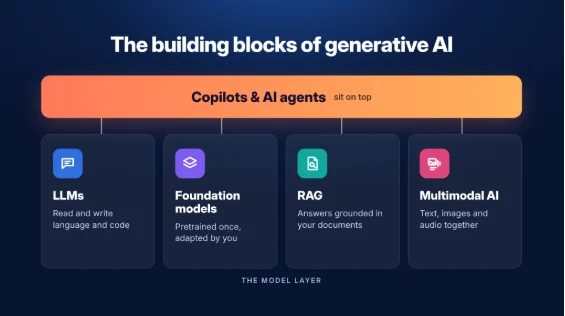
Four building blocks appear throughout this guide:
- Large language models (LLMs) generate and interpret language and code. Most enterprise use cases run on them.
- Foundation models are large pretrained models, from commercial providers or open-weight releases, that teams adapt rather than build from scratch.
- Retrieval-augmented generation (RAG) grounds a model’s answers in approved company documents at query time, improving accuracy and keeping responses current.
- Multimodal AI processes several input types together, for example, a claim photo plus the adjuster’s notes.
Copilots and agents sit on top of these models and are covered in the agentic AI section below.
Top Generative AI Use Cases for Businesses
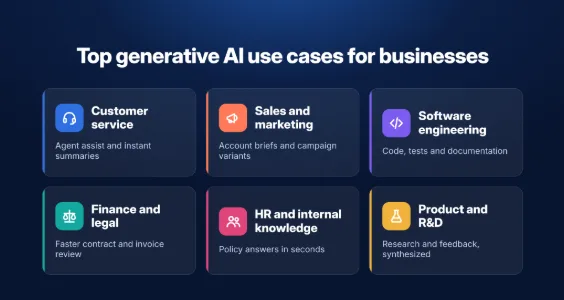
The functions below have the most mature patterns and the clearest metrics. Each pattern is a starting point; the right choice depends on your data, volume, and risk tolerance.
| Function | Business problem | GenAI pattern | Data needed | Metric to track | Risk level |
| Customer service | Long handle times, inconsistent answers | Agent assist, grounded answers, conversation summaries | Knowledge base, ticket history | Handle time, first-contact resolution | Medium |
| Sales and marketing | Slow research and content cycles | Account briefs, proposal drafts, campaign variants | CRM data, brand guidelines | Cycle time, win rate | Low to medium |
| Software engineering | Backlogs, slow testing and docs | Code assistance, test generation, incident summaries | Code repositories, runbooks | Lead time, defect rate | Medium |
| Finance and legal | Manual review of documents | Contract and invoice extraction, report narratives | Contracts, ledgers, policies | Review hours, error rate | High |
| HR and internal knowledge | Repeat policy questions, slow onboarding | Policy Q&A assistant, onboarding guides | HR policies, intranet | Ticket deflection, time to productivity | Medium |
| Product and R&D | Scattered research and feedback | Feedback clustering, research synthesis | Survey data, reviews, research papers | Time to insight | Low |
Customer Service and Contact Centers
Agent assist is the most proven entry point. The model suggests knowledge-grounded responses, summarizes conversations, and drafts follow-ups, while the human agent remains accountable for the answer. Start with internal assistance before exposing a model directly to customers.
Sales and Marketing
Sellers spend hours assembling account context. A model connected to CRM records and public filings can produce a one-page account brief in seconds. Marketing teams use it for variant testing and localization, with brand and legal review gates before anything ships.
Software Engineering and IT
Code completion, test generation, and documentation are mainstream. IT teams also use models to summarize incidents and draft change requests. Gains are largest on well-scoped tasks and smallest on novel architecture work.
Finance, Legal, and Operations
Extracting and summarizing contracts, invoices, and policies reduces the time spent on manual review. Because errors here carry financial or legal exposure, these workflows need confidence thresholds and mandatory human sign-off.
HR and Internal Knowledge
A policy assistant that answers “how many leave days carry over” with a cited source reduces repetitive tickets. Keep sensitive decisions, such as hiring and performance outcomes, outside the model’s authority.
Product and R&D
Product teams cluster thousands of reviews into themes, and R&D teams summarize literature. The output informs human decisions rather than replacing them.
Use Cases by Industry
Generative AI business applications vary most by regulation and data sensitivity. The table shows one high-value workflow per sector and the control it requires.
| Industry | High-value workflow | Value metric | Control required |
| Financial services | Advisor research assistant, KYC document review | Research hours saved, review cycle time | Model risk management, audit logs |
| Healthcare | Clinical documentation drafts, prior-authorization letters | Clinician documentation time | HIPAA safeguards, clinician sign-off |
| Retail and eCommerce | Product content at scale, shopping assistants | Content cost per SKU, conversion | Brand and claims review |
| Manufacturing | Maintenance copilots over manuals and work orders | Mean time to repair | Safety-critical review |
| Logistics | Exception handling, shipment status summaries | Exceptions resolved per hour | Customer data access controls |
| Public sector | Case summarization, citizen service assistants | Case processing time | Transparency and accessibility rules |
For a broader catalog by department, see our full list of generative AI use cases.
When Generative AI Is Not the Right Fit
Conventional software or predictive models solve some problems better:
- Deterministic calculations, such as tax computation or payroll, where a formula is exact.
- Processes that are undefined or change weekly, because the model cannot be evaluated against a stable standard.
- Tasks that require near-zero error with no room for human review.
Benefits of Generative AI for Business and How to Prove Them
Benefits only count when they move a business metric. Usage statistics, such as prompts per day or documents generated, describe activity and say little about value. Tie every initiative to return on investment (ROI) and KPIs defined before launch, and track leading indicators alongside financial outcomes.
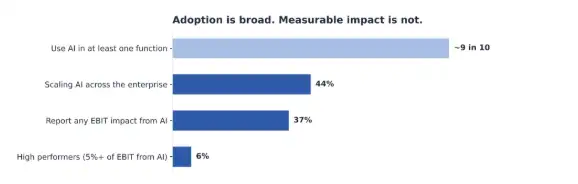
The gap between activity and value is wide across the market:
| Benefit | Leading indicator | Financial outcome |
| Productivity | Task completion time, throughput per employee | Cost per task, capacity redeployed |
| Customer experience | Response time, first-contact resolution, CSAT | Retention, cost per contact |
| Quality and consistency | Error rate, rework rate, policy adherence | Cost of quality, compliance exposure |
| Knowledge access | Time to find approved information | Onboarding cost, ticket deflection |
| Faster innovation | Experiment cycle time | Time to market, revenue from new offers |
The real lever for generative AI for business growth is redeployed capacity. Hours saved on drafting matter only if the team uses them to serve more customers, ship more features, or cut external spend.
Insight: MIT’s NANDA initiative (reported by Fortune, August 2025) found that more than half of generative AI budgets go to sales and marketing tools, while the largest measured returns came from back-office automation, such as reducing outsourced processing and agency spend.
Real-World Results: What the Evidence Shows
The most credible evidence for generative AI benefits for business comes from controlled studies and disclosed company results, not vendor claims.
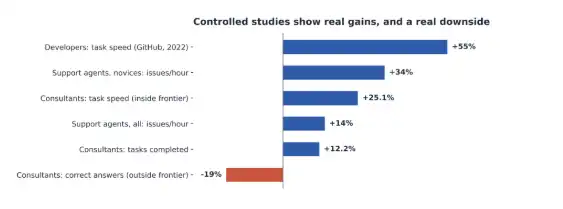
Customer support: A study of 5,179 support agents found a 14% average increase in issues resolved per hour, and 34% for novice agents.
Consulting work: In a preregistered experiment with 758 BCG consultants, those using GPT-4 completed 12.2% more tasks and worked 25.1% faster on tasks within the model’s capability. On a task outside that boundary, they were 19% less likely to reach the correct answer
Software development: In GitHub’s controlled experiment with 95 developers, the group using Copilot finished a coding task 55% faster.
Customer service at scale: Klarna reported that its AI assistant handled 2.3 million conversations in its first month, two-thirds of its service chats, cut average resolution time from 11 minutes to under 2, and reduced repeat inquiries by 25%. The company estimated a $40 million profit improvement for 2024.
What this means: Gains are real but uneven. They concentrate on well-defined tasks, favor less experienced staff, and can reverse when people trust the model on problems it cannot solve. Design human review around that boundary.
From Copilots to AI Agents: What Agentic AI Changes
- AI copilots suggest: they draft, summarize, and recommend while a person decides.
- AI agents act: they plan steps, call tools and APIs, and complete tasks such as updating a ticket or reconciling an invoice.
- Agentic AI describes systems where one or more agents pursue a goal across several steps with limited supervision. For a detailed comparison, read generative AI vs AI agents vs agentic AI.
Agents extend generative AI for business automation into processes that rule-based bots could not handle because inputs vary. Adoption is rising quickly at the top end: McKinsey’s 2026 survey found 40% of organizations with more than $1 billion in revenue are scaling agents, up from 27% a year earlier.
Gartner predicted in June 2025 that organizations will cancel over 40% of agentic AI projects by the end of 2027 because of rising costs, unclear business value, or weak risk controls. It also estimated that only about 130 of the thousands of vendors marketing agentic products offer genuine agentic capabilities.
| Where agents work today | Where to wait |
| Ticket triage and routing | Credit, hiring, or medical decisions without review |
| IT operations runbooks | Actions that move money above set limits |
| Invoice and order reconciliation | Customer commitments with legal effect |
| Research and report assembly | Any process without logging and rollback |
How to Choose Your First Use Case of Generative AI
The first use case sets the tone for every budget conversation that follows. Pick one that is valuable, feasible with current data, and low enough in risk to move fast.
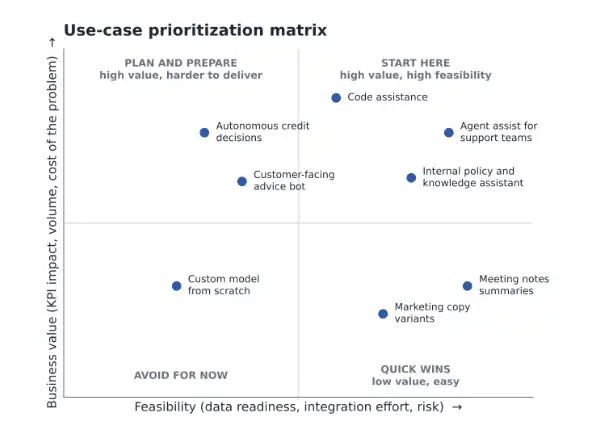
Score each candidate from 1 to 5 on these criteria and weight them to your priorities:
| Criterion | What a high score looks like |
| Business value | High volume, high cost per task, clear owner |
| Feasibility | Data exists, is accessible, and is reasonably clean |
| Data readiness | Sources are permissioned and have a clear source of truth |
| Risk | Reviewers catch errors before they reach customers |
| Adoption effort | Fits an existing tool and workflow users already open daily |
| Time to value | A working pilot is possible within 60 days |
A low-risk internal knowledge assistant usually scores well on every line. A customer-facing advice bot may score higher on value but worse on risk and data readiness, which makes it a strong second or third project.
Quick Readiness Check
- A named business owner is accountable for the outcome.
- A baseline metric exists for the current process.
- The required data is accessible with the right permissions.
- The budget covers integration, evaluation, and monitoring, not only licenses.
- Security and legal have agreed on the risk tier.
- Target users helped define the workflow.
- A review process exists for incorrect or unsafe outputs.
- The team has, or can contract, data and ML engineering skills.
Build, Buy, or Extend: Choosing Generative AI Solutions for Business
Choosing among generative AI solutions for business depends less on model brand than on how much control you need. Use build vs. buy vs. extend as the frame: buy a finished product, extend a platform with your data and workflows, or build a custom system.
| Approach | Best for | Data needed | Time to launch | Relative cost | Control |
| Buy: off-the-shelf assistant | General productivity, writing, meetings | Minimal | Days | Low | Low |
| Extend: prompting on a hosted model | Narrow drafting and classification tasks | Examples and instructions | Weeks | Low to medium | Medium |
| Extend: grounded knowledge assistant | Answers from company documents | Clean, permissioned documents | 1 to 3 months | Medium | Medium to high |
| Build: fine-tuned model | Specialized language, format, or tone at volume | Thousands of labeled examples | 2 to 4 months | High | High |
| Build: agentic workflow | Multi-step processes across systems | Process maps, APIs, test cases | 3 to 6 months | Medium to high | High |
Fine-tuning changes a model’s behavior with labeled examples. It is useful for format and style consistency, but it does not keep facts current, so most teams pair it with retrieval or skip it entirely. Quality gains usually come first from prompt engineering and context engineering: clear instructions, the right documents in the context window, and structured outputs.
There is no single best generative AI for business. MIT’s NANDA research, reported by Fortune in August 2025, found that purchased tools and vendor partnerships succeeded about 67% of the time, while internal builds succeeded roughly one-third as often. As a result, many enterprises extend proven platforms and partner with a generative AI development company to integrate, evaluate, and govern them.
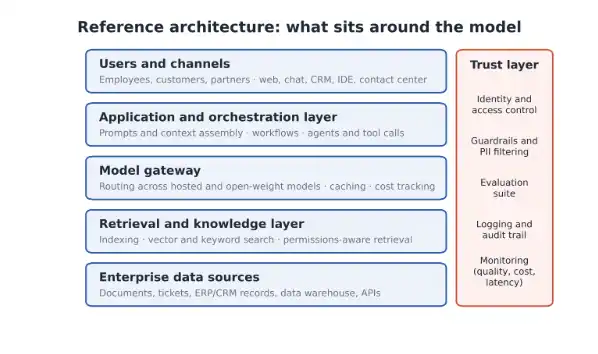
What Sits Around the Model
Enterprise generative AI is mostly the system around the model. The architecture below shows the layers most production deployments need.
Choosing a Model
Revisit model selection every few quarters. Route tasks across several models through a gateway, compare them on your own evaluation set, and weigh closed versus open-weight options on data residency, latency, cost per task, and the effort required to switch providers later.
What Is the Cost of Implementing Generative AI in Business?
Costs depend on architecture, volume, and risk level. Gartner estimated in July 2024 that enterprise deployment approaches can cost $5 million to $20 million and warned that generative AI costs are less predictable than other technologies. Most organizations start far smaller.
The ranges below are indicative planning figures for a single use case, not quotes.
| Scope | Indicative upfront cost (USD) | Main ongoing costs |
| Off-the-shelf assistant | Commonly $20 to $60 per user per month at list price | Seats, training |
| Prompt-based pilot on a hosted model | $25,000 to $75,000 | Usage fees, light support |
| Grounded knowledge assistant in production | $75,000 to $250,000 | Usage, indexing, evaluation, monitoring |
| Agentic workflow across systems | $100,000 to $500,000 | Usage, integration upkeep, oversight |
| Fine-tuned or custom model | $250,000 to $1 million+ | Retraining, hosting, MLOps staff |
Model usage is often the smallest line. Plan for inference costs and total cost of ownership (TCO), which include data preparation, integration, evaluation, security reviews, human review time, change management, and ongoing support.
Total spend can still rise as usage grows, so manage it actively:
- Route simple tasks to smaller, cheaper models.
- Cache frequent prompts and responses.
- Trim context to the documents that matter.
- Set budget alerts and per-team usage caps.
How to Measure ROI of Generative AI for Business
Measure the change in cost and quality per task against a baseline, over a defined window, with all costs included.
ROI = (Value gained − Total cost) ÷ Total cost
- Measure the baseline cost per task before launch: time, labor rate, error, and rework rate.
- Measure the same metrics after deployment, ideally against a control group doing the work without the tool.
- Count value only where teams redeploy capacity or avoid spending.
- Include every cost: build, licenses, usage, human review, support, and monitoring.
Worked example:
A support team of 100 agents handles 400,000 tickets a year at a fully loaded cost of $8 per ticket ($3.2 million). An agent-assist tool cuts handle time by 14%, in line with the NBER study above, saving about $448,000 a year.
First-year costs are $180,000 to build and $120,000 to run, for a total of $300,000.
ROI = ($448,000 − $300,000) ÷ $300,000, or about 49% in year one, rising in year two once build costs are absorbed.
Track quality next to savings. If faster handling raises repeat contacts, the reported savings overstate the real gain.
How to Implement Generative AI in an Enterprise: A 90-Day Roadmap
Successful generative AI implementation follows a gated sequence. Each phase ends with a go/no-go decision based on evidence.
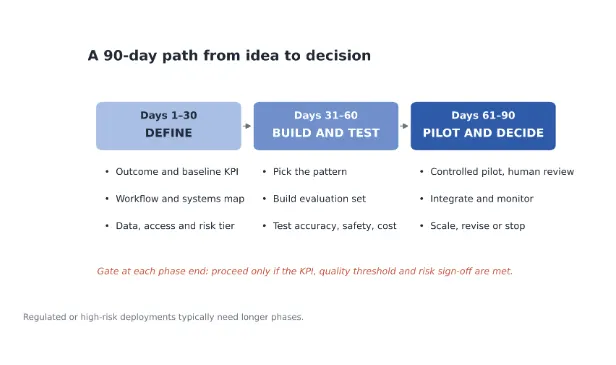
Days 1–30: Define
- Set the business outcome and capture the baseline metric.
- Map the workflow, users, exceptions, and the systems the solution must touch.
- Assess data quality, permissions, and the source of truth for each document set.
- Assign a risk tier with security and legal.
Days 31–60: Build and Test
- Choose the pattern using the approach table above.
- Build an evaluation set of 100 to 300 real examples with expected answers.
- Run model evaluation for accuracy, groundedness, safety, latency, and cost per task.
- Red-team the system for prompt injection and data leakage.
Days 61–90: Pilot and Decide
- Run a controlled pilot with a defined user group and human review.
- Complete workflow integration and change management: embed the tool where people already work, train users, and set escalation paths.
- Set up model monitoring and drift detection for quality, cost, and latency.
- Decide to scale, revise, or stop, based on the baseline comparison.
The Team You Need
| Role | Responsibility |
| Executive sponsor | Funding, priority, cross-team decisions |
| Business owner | Outcome, baseline, adoption |
| Product owner | Scope, backlog, user feedback |
| Data and ML engineers | Retrieval, integration, evaluation |
| Security, legal, and risk | Risk tier, controls, sign-off |
| Domain experts | Evaluation sets, output review |
A Faster Path for Small and Mid-Sized Businesses
The advantages of generative AI in business are not limited to large enterprises. Smaller firms can move in three steps: adopt an off-the-shelf assistant with clear usage policies, add one grounded assistant over their own documents, then automate one workflow end to end. Each step should pay for the next.
Why Pilots Stall
Gartner predicted in July 2024 that organizations would abandon at least 30% of generative AI projects after proof of concept by the end of 2025.. The causes are predictable:
| Cause | Warning sign | Fix |
| A demo instead of a business problem | No baseline metric | Start from a costed process |
| Poor or inconsistent data | Answers contradict each other | Clean and permission sources first |
| No evaluation set | Quality judged by anecdote | Build test cases before the pilot |
| No accountable owner | Decisions stall between teams | Name one business owner |
| Weak integration | Users copy and paste between tools | Embed in existing systems |
| Hidden running costs | Usage bills rise after launch | Model total cost before scaling |
Risks, Security, Governance, and Compliance
Risk in generative AI in business scales with what the system can see and do. Match controls to the risk tier instead of applying one standard everywhere.
Key Risks and Controls
| Risk | Control |
| Hallucination (confident but wrong output) | Ground answers in sources, show citations, allow the model to abstain, review high-impact outputs |
| Data leakage | Data classification, least-privilege retrieval, approved tools only |
| Prompt injection and unsafe tool use | Input filtering, sandboxed tools, permission limits, red-teaming |
| Bias and unfair outcomes | Representative test sets, outcome monitoring |
| IP and copyright | Vendor indemnities, source tracking, content review |
Data privacy, security, and access controls must extend to retrieval: a model should never return a document the user could not open directly.
Risk-Tiered Governance
AI governance and responsible AI practices turn principles into operating rules. Assign an owner to each system, and set up risk-tier review gates, logging and audit trails, and an incident response plan. Require human-in-the-loop review wherever an output affects a customer, employee, or financial decision.
Regulations to Know
| Jurisdiction | Framework | What to know |
| United States | NIST AI Risk Management Framework and its Generative AI Profile | Voluntary; widely used as the reference control set |
| United States | FTC Act and sector rules (HIPAA, GLBA) | Existing consumer protection and privacy law applies to AI outputs |
| United States | State laws, such as the Colorado AI Act | Duties for developers and deployers of high-risk AI systems. |
| European Union | EU AI Act | General-purpose AI model rules; Annex III high-risk rules apply from December 2, 2027 |
| European Union | GDPR | Lawful basis, data minimization, and rights over automated decisions |
| Global | ISO/IEC 42001 | Certifiable AI management system standard |
How SparxIT Helps Enterprises Adopt Generative AI
Most teams that come to us already have a pilot or an idea in their mind. What they lack is a clear answer to the question their CFO keeps asking: Is this worth investing in?
SparxIT works with global organizations to move generative AI for business from promising experiments to systems people rely on every day. Our work usually covers five areas:
- Use-case assessment: We score your workflows on value, data readiness, and risk, so you invest in the one most likely to pay off first.
- Grounded assistants: Our experts connect models to your approved documents and systems, so answers include sources your teams can verify.
- Agentic workflows: We automate multi-step processes such as ticket triage or invoice reconciliation, with human approval at the points that matter.
- System integration: As a leading generative AI services provider, we embed AI in the CRM, ERP, and service tools your people already use, so adoption doesn’t require another login.
- Governance setup: We put risk tiers, access controls, evaluation, and audit trails in place before launch, not after the first incident.
Most engagements begin with a short assessment. In a few weeks, you get a ranked shortlist of workflows, a baseline for each, and a cost 90-day plan your leadership can approve with confidence.
Generative AI for business transformation rarely starts with a big bang. It starts with one workflow that works, measured honestly, and a plan to build on it.

Partner with Experts
Frequently Asked Questions
How can generative AI transform business processes?


It shortens work that depends on reading, writing, and searching. Common examples include drafting responses, summarizing documents, extracting data from contracts, and routing requests. The biggest changes come when teams redesign the workflow around the model instead of adding it as a separate tool.
What are the top generative AI solutions for business transformation?
The most widely adopted solutions are enterprise assistants for productivity, coding assistants, contact-center agent assist, grounded knowledge assistants over company documents, and document processing for contracts and invoices. Agentic workflows for IT operations and back-office reconciliation are the fastest-growing category in 2026.
How does generative AI impact business efficiency and growth?
Efficiency gains are well documented in defined tasks:
- Controlled studies show 14% higher productivity in customer support
- 55% faster completion of a coding task.
Growth follows only when saved capacity is redeployed into revenue work, such as faster sales cycles, more personalized offers, or new digital services.
What challenges should businesses expect when adopting generative AI?
Expect scattered or poorly permissioned data, unclear ownership, difficulty proving financial return, integration effort with legacy systems, rising usage costs, and new risks such as hallucinations and prompt injection. Skills gaps and low employee trust also slow adoption when teams skip change management.
What industries benefit most from generative AI solutions?
Industries with heavy document and communication workloads benefit first: financial services, healthcare, software and technology, retail and eCommerce, insurance, legal services, and the public sector. Manufacturing and logistics see strong results in maintenance support and exception handling.
How can organizations reduce hallucinations in generative AI?
Ground responses in approved sources through retrieval, require citations, let the model decline when sources are missing, and keep prompts specific. Test against an evaluation set before launch, monitor answers in production, and route high-impact outputs to human review.
What ROI timeline should businesses expect from generative AI?
Plan to see leading indicators, such as faster handling time or higher deflection, within a 90-day pilot. Most teams measure financial payback for a well-scoped use case over 12 to 24 months.
What steps should companies follow to implement generative AI?
Define the outcome and baseline, map the workflow and data, assign a risk tier, choose the build or buy approach, build an evaluation set, run a controlled pilot with human review, integrate and monitor, and then scale, revise, or stop based on results.
How much does it cost to implement generative AI for business?
Off-the-shelf assistants commonly cost $20 to $60 per user per month at list price. A focused pilot often runs $25,000 to $75,000, and a production grounded assistant $75,000 to $250,000. Large enterprise programs can reach several million dollars. These are planning ranges; actual costs depend on scope, data, and risk level.
How long does a generative AI pilot take?
A well-scoped pilot typically takes 60 to 90 days and ends with a decision on whether to scale. Regulated or high-risk use cases often need longer for security review, legal sign-off, and testing.