For most enterprises, adopting AI isn’t about finding the latest or most powerful model. The bigger question is how to add AI capabilities to existing software that already runs the business. Those applications that handle critical workflows, sensitive data, and thousands of daily users.
Replacing a mature ERP, CRM, claims platform, payment system, or logistics application just to introduce AI can create more problems than it solves. Migration takes time, costs money, and can disrupt processes that already work.
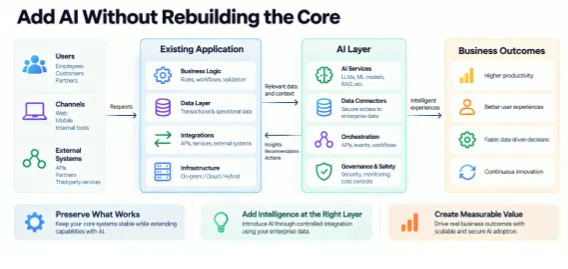
Instead, enterprises can often build AI around the existing system. The core application can continue handling transactions, business rules, authentication, workflows, and data. AI can take care of specific tasks such as summarizing information, extracting data, making predictions, generating recommendations, or improving search.
That’s what this blog explores. We’ll look at practical ways to add AI to existing software, from choosing the right integration approach to managing data, security, testing, and monitoring. We’ll also discuss when incremental integration is the right move and when a deeper modernization or full rebuild actually makes sense.
Key Takeaways
- Start with a measurable business problem, not the AI model. Identify where AI can improve an existing workflow or user experience.
- Preserve what already works. Avoid replacing core systems unless there is a clear technical or business reason to do so.
- Connect AI through the right integration layer. APIs, events, retrieval systems, and separate AI integration can add intelligence without changing the core.
- Keep data access secure and controlled. Give AI access to the information it needs without putting unnecessary pressure on production systems.
- Choose the right AI approach for the use case. Managed APIs, RAG, fine-tuning, and custom models each have different strengths.
- Test before you scale. Evaluate accuracy, security, cost, reliability, and user response before rolling AI out more broadly.
- Modernize only where needed. If the existing architecture can support the AI capability, incremental integration is often enough. Rebuild when the system becomes a genuine constraint.
Why AI Integration for Existing Software Does Not Require a Full Rebuild
In many cases, the existing system can continue doing what it does best. AI simply adds a new layer of intelligence around it.
For example, a service management platform can still manage cases and workflows. An AI integration service can work alongside it to summarize conversations, find relevant information, suggest next steps, or draft responses.
This separation also makes the system safer. If an AI provider changes its model, you should be able to switch it without changing the core application. If the AI service goes down, users should still be able to complete important tasks. And if a new model does not perform as expected, you should be able to remove or replace it without affecting the rest of the system.
What can remain unchanged?
The user interface, business rules, authentication, transactional database, workflow engine, and existing integrations can often stay as they are. You can connect AI through an API, service, event stream, or retrieval layer.
What may need to change
Some supporting pieces may need an update. You might need new APIs, data pipelines, authorization checks, monitoring, or background workflows. However, these changes can usually be limited to the AI use case. There is no need to rebuild the entire platform just to introduce one new capability.
How to Integrate AI into Existing Software Without Disrupting the Workflows?
In this section, we will cover how to identify the right AI use case, set measurable goals, choose the right integration approach, and how AI integration without rebuilding helps avoid disrupting existing workflows.
Step 1: Start With the Business Workflow, Not the AI Model
It is easy to get excited about the role of AI in digital transformation and then look for somewhere to use it. That is usually the wrong place to start.
Instead, look at how work is done today. Find a process that takes too much time, involves repetitive manual work, or creates avoidable errors. Then ask a simple question: Can AI make this process faster, easier, or more accurate?
Take insurance claims as an example. An adjuster may spend hours reading documents and entering information into the claims system. AI can extract the relevant details and prepare them for review. The adjuster still makes the final decision, but much of the manual work is already done.
The same idea can work in customer service, finance, procurement, logistics, healthcare, and other business operations. The best opportunities for AI integration for existing software usually involve repetitive work, enough data to work with, a clear performance baseline, and a process where mistakes can be reviewed or corrected.
-
Define the KPI before selecting the technology
Before selecting a model or AI tool, decide what success looks like. It could be shorter handling time, fewer errors, faster resolution, better conversion, or lower cost per transaction.
Next, set a realistic target. Also decide what level of error is acceptable. Not every AI task carries the same risk.
For example, 95% accuracy may be more than enough for routing support tickets. However, it may not be acceptable for a financial decision that cannot easily be reversed.
So, define what happens when AI is unsure. A human review step may be enough for some workflows. Higher-risk processes may need stricter controls and more separation from the core system.
-
Classify the workflow by consequence
Not every AI task carries the same risk, so the level of human oversight should depend on what happens next.
- Assistive: AI drafts, summarizes, searches, or recommends, while a person reviews the output and makes the final call.
- Advisory: AI provides a recommendation that helps guide a decision, but the system does not act on it automatically.
- Automated: AI output directly triggers a business action with little or no human involvement.
As the impact increases, so should the controls. Higher-risk workflows need stronger testing, audit trails, access controls, fallback options, and human approval.
Step 2: Assess Whether the Existing Software Is Ready
Before adding AI, take a close look at the software you already have. An older system is not automatically a problem. If it has stable APIs and well-managed data, it may be easier to extend than a newer system with tightly connected components.
-
Application architecture readiness
Start by understanding how the application connects with other systems. Look at its REST or GraphQL APIs, message queues, webhooks, events, and integration tools. More importantly, identify where the core business rules live and which databases hold the actual source of truth.
Pay close attention to critical transactions. If a process normally finishes in a few hundred milliseconds, adding an AI request that takes several seconds could slow everything down. In that case, an asynchronous workflow or a precomputed AI result may be a better choice.
-
Data readiness
AI is only as useful as the data it can access. Check whether the data is accurate, up to date, well-structured, and easy to access. Also, know who owns it and who is allowed to use it.
For generative AI development, you may need access to changing internal information. Instead of giving the model direct access to operational databases, a retrieval layer can provide the right information when it is needed.
-
Infrastructure readiness
AI integration for existing software can introduce new demands on your infrastructure. Review your computer, storage, network capacity, scaling, deployment process, logging, and monitoring.
Then estimate how much AI traffic you expect. A real-time request, a background task, a batch process, and an event-driven workflow will each place different demands on the system.
-
Security and compliance readiness
Follow the data from the moment a user makes a request to the moment AI returns a result. Know what data is being shared, where it is processed, how long it is stored, and who can access the output.
Use the minimum permissions needed. Most importantly, use AI in software testing to catch AI-generated malicious code reaching the production systems.
-
Define Who Owns What
AI also needs clear ownership. Someone needs to be responsible for the business outcome, while engineering teams handle application reliability and data, or ML teams manage model behavior.
Security and compliance teams should define the necessary controls. This matters because once AI becomes part of a live application, it becomes another production dependency that someone must manage.
Step 3: Choose the Right AI Integration Architecture
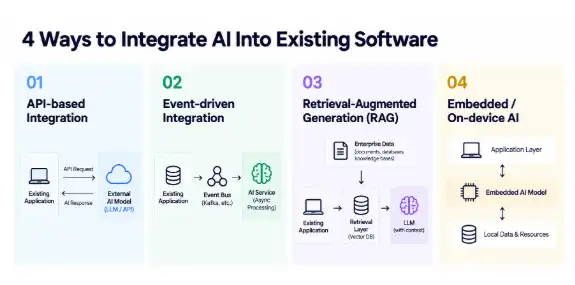
There is no single way to add AI to existing software. The right approach depends on what the AI needs to do, how quickly it needs to respond, what data it can access, and how much risk the business can handle.
If you need outside help, you can also work with an experienced AI development company. However, look beyond marketing claims. Check their technical experience, previous integrations, and ability to support the system after launch.
| Pattern | Best fit | Primary trade-off |
| API-based | Interactive assistants, classification, summarization, prediction | Simple to adopt, but you must control latency and provider dependency. |
| Event-driven | Document processing, enrichment, post-transaction analysis | Excellent isolation, but introduces asynchronous state and eventual consistency. |
| Embedded/edge | Low-latency, offline, or privacy-sensitive workloads | Reduces network dependency but increases device/model lifecycle complexity. |
| RAG | Enterprise knowledge and frequently changing information | Requires disciplined indexing, retrieval quality, and authorization. |
-
API-based integration
This is often the simplest way to get started. The existing application sends a request to an AI service and receives the result.
For production use, though, you need more than an API connection. Add authentication, input checks, timeouts, retry limits, rate controls, and clear fallback options. That way, a temporary AI failure does not bring down the application.
-
Event-driven AI
Some AI tasks do not need an immediate response. In those cases, an event-driven approach can work better.
For example, when a claims document is uploaded, the application can place it in a queue. An AI service can then classify the document and extract the required information in the background. The main application stays responsive while the AI task runs separately.
-
Retrieval-augmented generation
Sometimes AI needs access to your company’s own information. This could include documents, policies, contracts, or knowledge bases.
With RAG, that information stays outside the model. The system finds the relevant content first and then gives only that context to the AI model.
Access control is important here. If a user cannot access a document in the original system, they should not be able to get its AI-generated summary either.
-
How to select the pattern
Start with the business needs. Ask how quickly the AI needs to respond, how sensitive the data is, how important the workflow is, and what happens if the AI service fails.
Also consider scale, data freshness, offline requirements, and how much human involvement is needed. The best architecture is not the newest or most popular one. It is the one that fits the way your software and business actually work.
Step 4: Design the AI Boundary So the Core Application Stays Stable
The goal is simple: AI should be easy to change without having to change the entire application. Keep the AI logic separate from the core system. That way, you can change the model, prompts, or retrieval setup without touching business-critical code.
For example, a service management platform could have a separate “case summary” service. It handles the prompts, model selection, data retrieval, testing, and versioning. The main application simply asks for a summary and receives the result. It does not need to know which AI model is behind it.
-
Use stable contracts
Keep the connection between the application and AI simple and predictable. Define what information goes in and what comes back. Version these interfaces carefully and validate requests at the boundary.
It also helps to include identifiers that show where each AI result came from. If the same event could be processed twice, use idempotency to prevent duplicate actions.
-
Design for graceful failure
AI retrofit for existing software will sometimes be slow, unavailable, or simply wrong. Your application should be ready for that.
Use timeouts, queues, cached results, confidence checks, and human review where needed. Most importantly, an AI failure should affect the AI feature, not the entire application. For example, if a case summary fails, a customer-service agent should still be able to open and manage the case.
-
Separate model and application release cycles
Your application should not have to wait every time an AI model or prompt changes. Keep model versions, prompts, retrieval settings, and application releases independent where possible.
Feature flags, controlled testing, and gradual rollouts can help you catch problems early. If a new model performs poorly, you should also be able to roll it back without rolling back unrelated application changes.
Step 5: Add AI to Existing Software Without Overloading Production
Getting AI the right data can be harder than connecting the model itself. A direct connection to the production database may seem easy at first. However, AI queries can put extra pressure on systems that are already handling critical transactions.
-
Separate transactional and analytical workloads
Production databases are built to handle predictable business transactions. AI workloads are different. They may need large amounts of historical data, repeated searches, or complex analysis.
So, depending on how fresh the data needs to be, use a read replica, data warehouse, lakehouse, cache, or dedicated search index. This keeps AI workloads from slowing down the core application.
-
Use event streams when freshness matters
Sometimes AI needs the latest information. In that case, event streams can keep a separate AI-ready data layer updated without constant queries against the production system.
For example, order updates, customer changes, claims activity, or inventory movements can trigger events. The AI service can then work with that updated data when needed.
-
Protect permissions throughout the data path
Moving data to another system does not mean access rules should disappear. The same permissions should apply when AI retrieves information.
Check who can access the data based on the user, role, tenant, business unit, or document. Also, keep access logs, but avoid putting sensitive information into application or AI logs unnecessarily.
Step 6: Choose Between Managed APIs, RAG, Fine-Tuning, and Custom Models
The least complex solution that meets the business requirement is normally the best starting point. Enterprises frequently over-engineer early AI modernization of legacy software initiatives by training or fine-tuning models when retrieval and application controls would solve the actual problem.
-
Managed AI APIs
For common AI tasks, a managed API is often the easiest place to start. It can help you test an idea quickly without building the model yourself.
However, consider the trade-offs. Provider dependency, data handling, usage limits, response time, regional processing, and changing costs can all affect your decision.
-
RAG for changing enterprise knowledge
If AI needs to work with information that changes often, RAG can be a better fit. This could include company policies, manuals, contracts, product details, or customer records.
Instead of retraining the model every time the information changes, RAG retrieves the latest relevant information and gives it to the model. The focus then shifts to keeping the data fresh, improving search quality, and enforcing the right access controls.
-
Fine-tuning for specialized behavior
Sometimes prompts and retrieval are not enough. If you need the AI to follow a specific format, classify information consistently, or handle a specialized task, fine-tuning may help.
Keep in mind that fine-tuning also adds ongoing work. You need good training data, regular evaluation, version control, deployment processes, and regression testing.
-
Custom models for genuinely differentiated workloads
A custom model makes sense when the requirements are highly specific. It can be useful when performance, privacy, data ownership, or competitive differentiation are especially important.
Still, building your own model is a major commitment. Owning the model is not the goal. Solving the business problem is.
Step 7: Build and Validate the First AI Capability in Controlled Stages
Don’t take an AI feature from a quick prototype straight into production. Start small, learn from real usage, and expand only when the results are good enough.
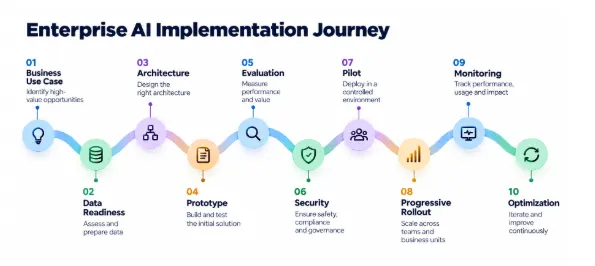
Stage 1: Proof of concept
Start with one clearly defined workflow. Test whether AI enhancement for existing software can actually solve the problem and compare the results with the current process.
There is no need to build a large AI platform at this point. First, prove that the use case is worth pursuing.
Stage 2: Pilot
Once the idea works, let a small group of users try it. Watch how they use the feature and where they correct or ignore its suggestions.
Also, track response time, cost, accuracy, adoption, and business results. Most importantly, record failures so the team can understand what needs to improve.
Stage 3: Production
Before going live at scale, put the right safeguards in place. This includes security, monitoring, cost controls, evaluation checks, incident procedures, and a clear way to roll back changes.
For important workflows, roll out the feature gradually. This limits the impact if something goes wrong.
Stage 4: AI-specific testing
Regular software testing is still important, but AI needs additional checks. Test it with normal requests, unclear inputs, unusual situations, and cases designed to expose weaknesses.
Look at accuracy, unsupported answers, retrieval quality, unsafe responses, response time, and performance under load.
For high-impact workflows, shadow mode can be especially useful. AI can generate recommendations in the background without affecting the actual outcome. This gives the team a chance to see how it performs in real conditions before users or customers have to rely on it.
Step 8: Build Security and Governance Into the Integration
Security should not come after the AI feature is built. It needs to be part of the design from the start. The good news is that most of these controls can be built directly into the integration.
-
Control data exposure
AI does not need access to everything. Send only the information required for the task. Mask sensitive details when they are not needed, encrypt data, use limited-access credentials, and define clear retention rules.
Also, remember that prompts, retrieved information, AI responses, and logs may contain sensitive data. Treat them accordingly.
-
Control what AI can do
Giving AI access to information does not mean giving it permission to take action.
For example, an AI tool that summarizes a customer case should not also be able to issue a refund. Keep read-only access separate from actions that can change data or affect customers. For high-impact actions, require human approval.
-
Make AI activity auditable
When something goes wrong, you need to know what happened. Keep records of who made the request, which application transaction was involved, which model and version were used, what information was retrieved, and what action followed.
At the same time, avoid storing more sensitive information than necessary.
-
Manage third-party AI risk
Using an external AI provider also means depending on another company’s systems and policies. Before choosing one, look at how it handles data, where it processes information, how reliable the service is, and what happens when models or service terms change.
This matters because an AI provider can change or retire a model without any changes to your application. Your integration needs a plan for that.
Step 9: Operate AI as a Production System
An AI feature does not become ‘done’ when it reaches production. Over time, data changes, users behave differently, and models get updated. So, the system needs ongoing attention.
-
Monitor application, AI, and business performance together
Start with the basics. Track application health, response times, errors, and availability. Then look at AI performance, including accuracy, retrieval quality, unexpected outputs, and changes in behavior.
Most importantly, connect these numbers to business results. Are users adopting the feature? Is it reducing handling time, improving resolution rates, or lowering costs? These are the results that ultimately matter.
-
Control AI cost at the unit level
AI costs can grow quickly as usage increases. Instead of looking only at the overall project budget, track the cost of each case, document, interaction, or prediction.
For AI models that process large amounts of text, also watch token usage, retrieval calls, caching, and how often the model is being used. This makes it easier to see whether scaling the feature actually makes financial sense.
-
Create a feedback loop
Your users can tell you a lot about how well AI is working. Pay attention to corrections, edits, and overrides.
For example, if customer-service agents regularly rewrite AI-generated summaries, something may be wrong. The issue could be the prompt, retrieved information, model, workflow, or source data.
So, before retraining the model, find the real cause. Then fix the part of the system that is actually creating the problem.
When Incremental AI enhancement for existing software Is No Longer Enough
AI integration without rebuilding the system can be a smart approach, but it is not always the right one. Sometimes, the existing architecture simply gets in the way.
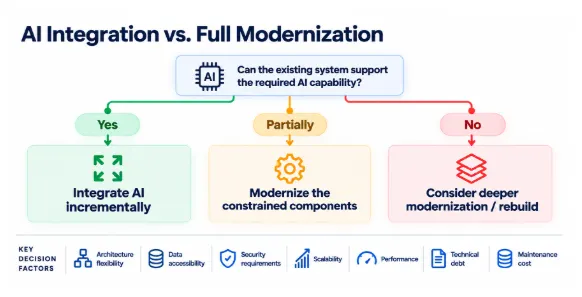
You may need deeper modernization when:
- There is no reliable way to connect AI without making major changes to the application.
- Critical data is stuck in outdated systems or formats that cannot support the access AI requires.
- Development and release cycles are too slow to test and improve AI effectively.
- The platform cannot meet security, performance, scalability, or availability needs.
- Technical debt makes it difficult to isolate AI, monitor it, or test it properly.
- AI becomes part of the core workflow rather than simply supporting it.
Even then, a full rewrite may not be necessary. Instead, start by modernizing the parts that are holding you back. For example, you can move one capability into a new service, gradually shift traffic to it, and retire the old component over time.
This approach reduces disruption while giving the architecture room to improve.
The decision should also make financial sense. Look beyond the cost of rebuilding. Consider technical debt, operational risk, development speed, expected AI value, and how long the existing platform can realistically support the business.
A 90-Day Enterprise Roadmap to Integrate AI into Existing Software
A 90-day roadmap helps enterprises move from identifying the right AI use case to building, testing, securing, and launching an AI capability within existing software.
| Phase | Key activities | Gate |
| 0–30 days | Use-case selection, baseline KPIs, architecture/data readiness, security review, pattern selection. | Is the use case valuable, feasible, and controllable? |
| 31–60 days | POC, evaluation set, integration boundary, retrieval/model workflow, controlled testing. | Does AI beat the baseline at acceptable risk and cost? |
| 61–90 days | Pilot, observability, governance, progressive rollout, support model, cost tracking. | Is it production-ready and operationally sustainable? |
| 90+ days | Scale validated patterns; modernize constrained components; expand use cases. | Which next use cases justify investment? |
Real-world Use Case of AI-Powered Software Integration
Example: Adding AI to an Existing Claims Platform
- Keep the core claims system intact to manage policies, coverage, records, workflows, and payments.
- Use AI to extract key information from documents and return structured data with confidence scores.
- Send low-confidence results to an adjuster for review before updating the core system.
- Add a retrieval layer to help adjusters quickly find relevant policy terms and approved documents.
- Apply the same customer, role, and organizational permissions when AI retrieves information.
- Show supporting sources with AI responses to reduce the risk of unsupported answers.
- Add AI around specific bottlenecks instead of replacing the entire claims platform.
- For customer-facing chatbots, keep identity, permissions, escalation, monitoring, and downstream actions under enterprise control.
Conclusion
Enterprise AI adoption does not have to start with a full rewrite. In many cases, the existing software already does the important work. The smarter move is to identify where AI can add real value and improve those areas first.
With the right architecture, enterprises can add AI to existing software while keeping core systems, data, and workflows intact. APIs, retrieval layers, and separate AI services can make this possible without creating unnecessary disruption.
However, AI still needs proper security, testing, monitoring, cost controls, and human oversight. Start small, measure the results, and expand when the value is clear.
The goal is not to use the most advanced AI model. It is to solve a real business problem, improve the user experience, and create lasting value without taking unnecessary risks.
How can SparxIT Help you Add AI Features to Existing Application?
SparxIT helps enterprises integrate AI into existing applications without disrupting the systems they already rely on. We first understand the application, data, workflows, and business goals. Then, we identify where AI can make a practical difference.
Our team builds AI capabilities such as intelligent automation, predictive analytics, conversational interfaces, recommendations, document processing, and RAG. We use the integration approach that fits the use case while keeping the core application stable.
Our experience includes:
- Niva Bupa: We built an AI-powered digital induction platform with interactive evaluations, real-time analytics, and feedback loops to improve employee enablement.
- Suzuki: Our experts reengineered its digital ecosystem with AI-powered web experiences, AWS infrastructure, and streamlined lead and inventory management to improve customer engagement and growth.
We also focus on security, performance, testing, monitoring, and cost management to help enterprises scale AI with confidence.

Partner with Experts
Frequently Asked Questions
How much does it cost to add AI to existing software?


The cost can vary widely because every application and AI use case is different. For a typical enterprise implementation, AI integration can range from $20,000 to $150,000+, depending on the scope.
The main cost factors include:
- AI model or API usage
- Application and API integration
- Data preparation and architecture
- Security and compliance
- AI testing and evaluation
- Infrastructure and deployment
- Ongoing monitoring and maintenance
A simple AI feature may cost much less, while complex workflows, custom models, or large-scale integrations can push the cost significantly higher. It is also important to consider ongoing costs such as cost per document, interaction, case, or AI inference.
How long does it take to add AI to an existing product?
The timeline depends on the use case, data readiness, and integration complexity. A focused AI capability can typically take 4 to 12 weeks to move from initial assessment to a production-ready implementation. Larger enterprise projects may take several months.
A typical timeline looks like this:
- Assessment: 1 to 2 weeks
- Proof of concept: 2 to 4 weeks
- Controlled pilot: 2 to 4 weeks
- Production hardening: 2 to 6+ weeks
Rather than treating AI integration as one development sprint, it is better to start small, test the results, and expand once the technology, security, and business value are proven.
Do we need to rebuild our existing system to add AI?
Not necessarily. If the application has usable APIs, events, accessible data, and a bounded AI use case, you can often introduce AI through a separate service, API, event-driven workflow, or retrieval layer. A deeper modernization becomes relevant when the existing architecture prevents safe integration, scalability, security, or maintainability.
What are the most impactful AI features to add first?
Start with a problem that already costs time, money, or effort. AI works best when the improvement can be measured.
Common starting points include:
- Document extraction
- Intelligent search
- Customer-service summaries
- Recommendations
- Data classification
- Forecasting
- Knowledge assistants
- Decision support
The best first feature usually has a clear business owner, measurable results, and manageable risk.
What is the best way to add AI features to an existing application?
Start with one measurable workflow, assess application and data readiness, select the simplest suitable AI architecture, isolate the AI capability behind a stable interface, and validate it through a controlled pilot. Scale only after quality, security, reliability, and economics are proven.