Ask engineering leaders which application they would least like to change, and most of them can name it immediately. It processes payments, policies, or orders. It has not failed in years. Nobody wants to be the person who modifies it. That reluctance has a real cost. Test cycles stay long and manual, specialists are hard to replace, and new business ideas wait months for engineering capacity. AI in legacy application modernization targets this problem directly. It shortens the two slowest parts of changing an old system (reading the code and proving the change is safe), so nobody has to bet the business on a rewrite.
Engineering time is already stretched thin. In Atlassian’s State of Developer Experience Report 2025, a Wakefield Research survey of 3,500 developers and managers in six countries published in July 2025, coding took up only 16% of developers’ working time. Half of the respondents said they lose 10 or more hours a week to friction outside of coding (Atlassian). Legacy applications make that worse, because every change has to be traced through code that few people fully understand.
Why do so many modernization programs stall before they finish? Rewrites run over budget, business rules get misread during conversion, and testing takes far more time than planned. Used with discipline, AI shortens the slowest phases and gives decision makers better evidence. Used carelessly, it adds new risks. This guide covers where AI-driven legacy application modernization fits in each phase, what it gets wrong, and how to run a pilot that produces numbers you can trust.
Key Takeaways
- Legacy application modernization using AI pays off most before and after the new code is written, when teams read the old system and prove the new one behaves the same way.
- AI is strongest at reading, explaining, and drafting. Rule-based automation is strongest at reliably repeating the same steps. Mature programs use both.
- Every phase of a program, from discovery to production support, now has practical AI and automation use cases.
- AI output still needs human review, equivalence testing, and clear governance, especially in regulated industries.
- Start with one bounded application, build a test baseline, and define metrics that you can compare before and after the pilot.
What Is AI in Legacy Application Modernization, and Why Does It Matter?
AI-augmented legacy application modernization means using machine learning and generative AI, alongside rule-based automation, to read, convert, test, and migrate older software faster than a team could by hand. Legacy application modernization itself is the work of updating, re-architecting, or replacing older systems so they run on current platforms, connect through modern APIs, and can be changed safely. It sits inside the broader discipline of application modernization, which also covers newer systems that need to move to a different hosting platform, such as containers.
The word legacy does not describe age alone. A ten-year-old .NET monolith can be a greater liability than a well-maintained mainframe program.
Signs an Application Is Due for Modernization
- Small changes need long release cycles and manual regression testing.
- Knowledge of the code sits with a small number of people who would be hard to replace.
- The vendor, language runtime, or operating system is out of support.
- Integrations depend on file transfers or screen scraping instead of APIs.
- Security patches arrive late, or the system cannot meet current audit requirements.
- Hosting and license costs rise every year while the feature set stays the same.
Why Manual Modernization Programs Stall
Most programs do not stall because of the target technology. They stall because of five problems that surround the code.
- Lost knowledge: Documentation is missing or wrong, so teams spend months reading code before they can plan.
- Hidden business rules: Pricing logic, eligibility checks, and regulatory edge cases live inside thousands of lines of procedural code.
- Accumulated technical debt: Years of patches, copy-paste fixes, and dead code make every change harder to predict. Retiring this debt is the whole point of modernization.
- Testing burden: Proving that the new system matches the old one often takes longer than building it.
- Data risk: Old schemas, inconsistent formats, and undocumented field meanings make migration the riskiest step.
Insight: The slowest phases of a modernization program are understanding the old system and verifying the new one. These are exactly the phases where AI and automation now help the most.
How AI Transforms Legacy Application Modernization
The clearest way to see the role of AI in legacy application modernization is to look at how engineers spend their time. In a manual program, senior engineers spend most of their time reading old code, writing documentation, and building test cases by hand. With AI assisting the program, those same experts spend more of their time reviewing drafts, resolving edge cases, and making architecture decisions.
That shift matters because expert time is the most limited resource in any modernization effort. A COBOL specialist who reviews AI-generated explanations can cover far more programs in a week than one who writes every explanation by hand.
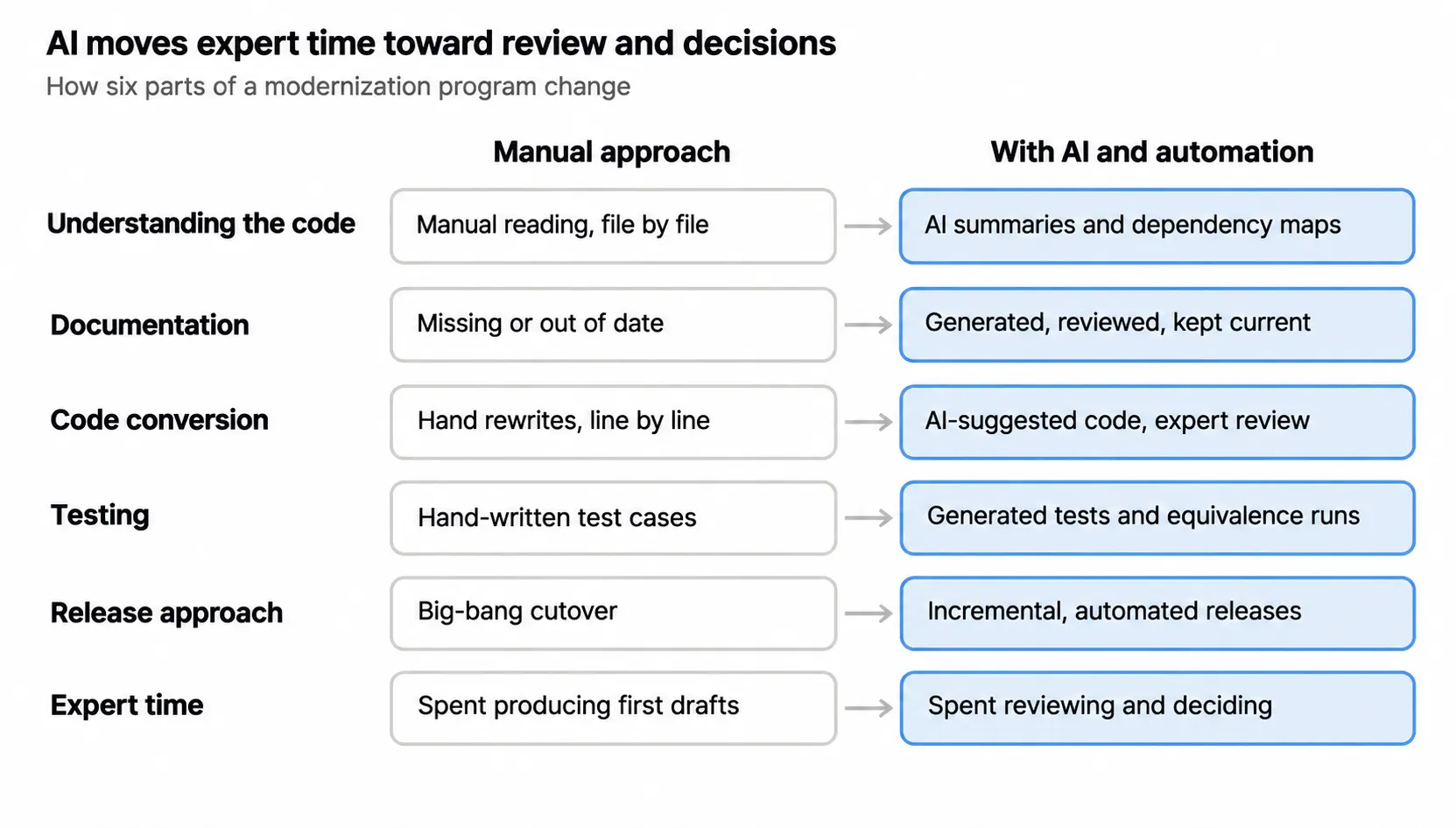
The work does not disappear. It moves to review, where an expert’s judgment has the most effect.
Programs that use AI well show four clear changes.
- Comprehension becomes a starting point. Large language models explain modules, trace data flows, and draft call graphs early in the program, so planning no longer waits for months of code reading.
- Documentation stays current. Rules extracted by AI become a living reference that survives staff turnover.
- Change becomes incremental. Faster analysis and test generation make it practical to modernize one module or service at a time, instead of relying on a single cutover weekend.
- Skills widen. Developers without deep mainframe experience can work on legacy code with AI explanations to guide them, while specialists focus on review.
Insight: AI moves your experts from producing first drafts to judging them. Their knowledge still decides the outcome, and it now reaches more of the codebase.
AI vs Automation in Modernization: What Is the Difference?
The two terms often appear together, but they solve different problems. Automation follows rules you define and produces the same result every time. AI learns patterns from data and produces a probable answer, which can be excellent or subtly wrong.
In practice, AI application modernization works best when AI proposes and automation checks. An AI model suggests a refactor. An automated pipeline then compiles the change, runs the regression suite, and blocks the merge if anything breaks.
| Rule-based automation | AI (machine learning, generative AI, agents) | |
| How it works | It follows scripts and rules that your team defines. | It learns from code and data, then predicts or generates output. |
| Output | The output is repeatable and predictable. | The output is probabilistic, and its quality varies with context and prompts. |
| Typical modernization uses | It handles code scanning, rule-based conversion, builds, deployments, regression runs, and data reconciliation. | It handles code explanation, business rule extraction, refactoring suggestions, test generation, and anomaly detection. |
| Best at | It works best on high-volume, well-defined steps. | It works best on ambiguous, knowledge-heavy work such as reading undocumented code. |
| Main risk | It is rigid and fails on cases that nobody scripted. | It can produce hallucinated output or output that looks correct but is wrong. |
| Human role | Humans define the rules and maintain the pipelines. | Humans review, approve, and correct every output that reaches production. |
The takeaway for planning is to budget for both. AI alone gives you drafts that you cannot verify at scale. Automation turns those drafts into tested, deployable code.
Where AI and Automation Fit in Each Phase of Legacy Application Modernization
AI in legacy application modernization is not a single step in the plan. Each phase has its own use cases, and each needs its own review point.
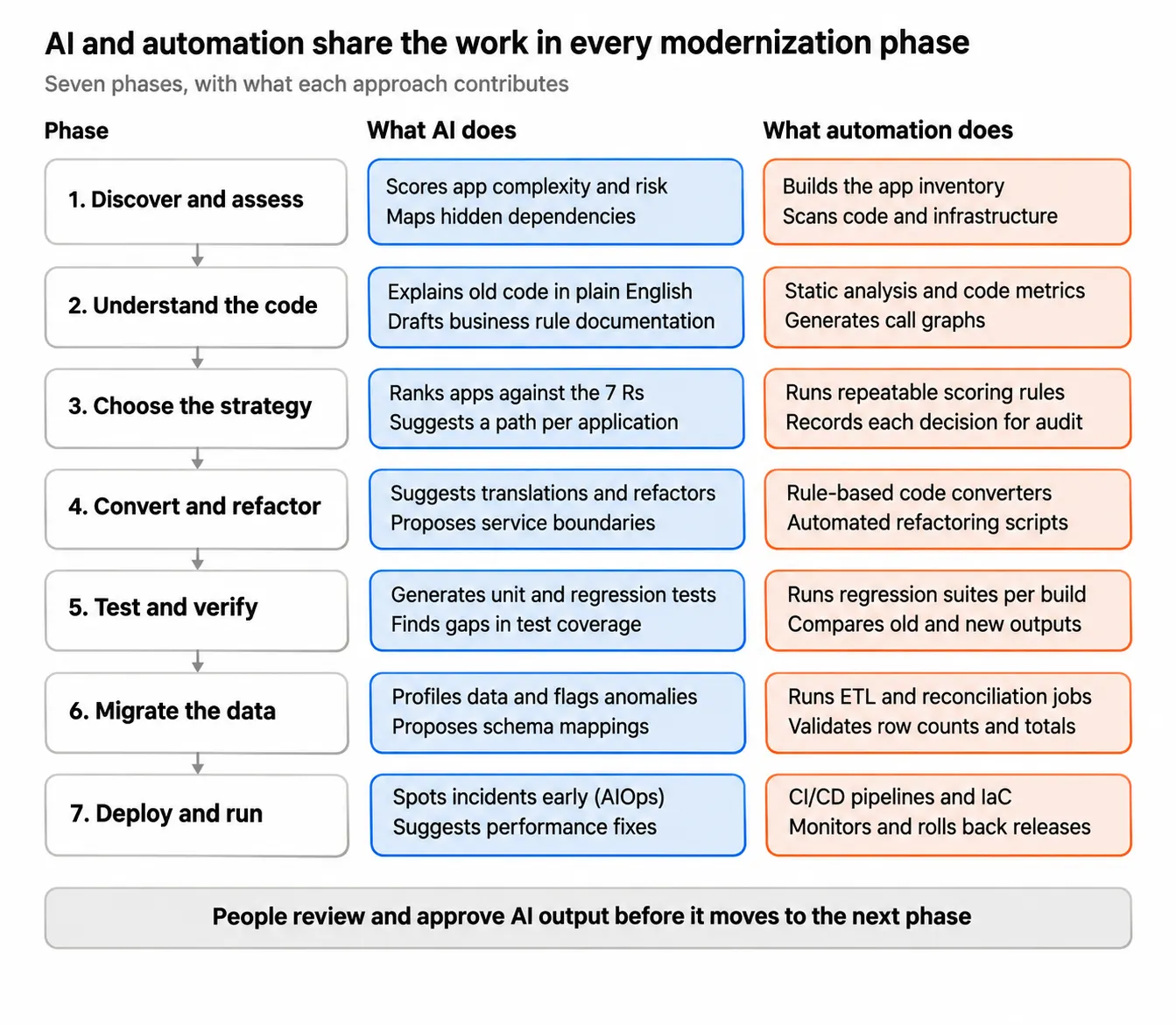
The seven phases below show what AI and rule-based automation contribute at each stage.
1. Discovery and Portfolio Assessment
Automated scanners build an inventory of applications, interfaces, databases, and batch jobs. AI then scores each application for complexity, business value, and risk, and maps dependencies that no spreadsheet captured. The result is a fact-based portfolio view that does not depend on months of interviews and workshops.
2. Code Comprehension and Business Rule Extraction
This phase is where generative AI for legacy application modernization delivers its most visible gains. Models trained on code can explain COBOL paragraphs, PL/I procedures, or Visual Basic forms in plain English. They can also draft business rule catalogs, such as “claims over a set amount route to manual review,” for subject matter experts to confirm.
3. Choosing the Modernization Path
With comprehension and scoring data available, architects can build a legacy application modernization strategy grounded in evidence. AI helps rank each application against the 7 Rs, such as rehost, replatform, refactor, and repurchase. Automation keeps the scoring rules consistent across hundreds of applications, so decisions can be audited later.
4. Code Conversion and Refactoring
Rule-based converters handle predictable syntax translation at volume. AI handles the cases that rules cannot cover. It suggests idiomatic rewrites, untangles shared state, and proposes service boundaries when you move from monolith to microservices. For legacy code modernization in languages such as COBOL or older Java, this pairing produces code your teams can maintain, not a line-by-line translation nobody wants to own. Automated code refactoring tools then apply consistent patterns, such as removing dead code or standardizing error handling, across the whole codebase.
5. Testing and Equivalence Checks
Automated test generation turns extracted rules and production traces into unit and regression tests. The strongest programs add equivalence testing. They run the old and new systems side by side on the same inputs and compare outputs field by field. Any mismatch blocks the release.
6. Data Migration and Validation
AI profiles source data, flags anomalies, and proposes schema mappings, including fields whose meaning was never documented. Automated ETL jobs move the data, and reconciliation reports confirm row counts, totals, and key business figures before cutover.
7. Deployment and Run
CI/CD and infrastructure as code make every release repeatable, from build to production, with rollback ready if a check fails. After go-live, AIOps platforms watch logs and metrics, detect unusual behavior early, and help teams fix issues before users notice.
If you are deciding between rehosting, refactoring, or replacing an aging system, our legacy software modernization service covers each path.
How Agentic AI Is Changing Modernization in 2026
The first wave of AI in modernization was the coding assistant. A developer asks a question and the model answers. Agentic AI goes beyond that interaction. An agent receives a goal, such as “upgrade this service to a supported Java version.” It then plans the steps, reads the codebase, edits files, runs the build and tests, and reports what it changed.
Cloud providers and platform vendors now ship agent-based modernization services. Examples include AWS Transform for mainframe and .NET workloads, GitHub Copilot app modernization for Java and .NET upgrades, and IBM watsonx Code Assistant for Z for COBOL-to-Java work. Capabilities change quickly, so evaluate each one against your own codebase rather than its launch announcement.
Agents work well for repetitive tasks that have a clear scope, such as:
- Upgrading framework and runtime versions across many repositories.
- Remediating vulnerable dependencies.
- Generating tests and documentation for existing modules.
- Breaking a large migration into reviewable pull requests.
This keeps the focus on what agents can do while making the list easier to read.
They still need guardrails. Give agents limited permissions, a reliable test suite to check their work, and a human approver for every merge. An agent that cannot prove its change against tests is only producing unverified output at high speed.
Expert view: Treat an AI agent like a capable new team member. It moves fast, but it does not yet know your business rules, and its work needs code review until it earns trust on lower-risk tasks.
Benefits of AI in Legacy Application Modernization
The business case for AI in legacy application modernization rests on time, cost, and risk, and each benefit should be measured against a baseline taken before the program starts. Early evidence is encouraging. In a January 2025 experience report, Google engineers described a large internal migration from 32-bit to 64-bit IDs, where 80% of the code changes that landed were fully AI-authored and total time spent fell by an estimated 50% (Redel). Your results will depend on code quality, test coverage, and your review capacity.
1. Shorter Timelines
Discovery, documentation, and test creation are the phases that compress the most. Teams can start design work with a working understanding of the system instead of waiting for manual analysis to finish.
2. Lower Run and Maintenance Cost
Modernized applications on current platforms are usually cheaper to host, patch, and staff. Fewer specialist contractors are needed to maintain old runtimes, and automated pipelines reduce the manual effort behind every release.
3. Higher Release Quality
Generated tests and equivalence checks catch regressions before they reach users. Over time, the test suite itself becomes an asset that protects every future change.
4. Business Knowledge That Stays
Rules known by only one engineer, or hidden in code nobody could read, end up in documentation your whole organization can use. Your business no longer hinges on one person’s memory, long after the program ends.
5. Lower Security and Compliance Exposure
Unsupported systems are harder to patch and monitor, and attackers know this. Verizon’s 2026 Data Breach Investigations Report found that 31% of breaches now start with exploiting software vulnerabilities, making it the most common initial access method, ahead of stolen credentials (Verizon DBIR 2026). Retiring unpatched platforms removes much of that exposure.
How to Measure the Benefits of Legacy Modernization
Track a small set of metrics from day one. The first two are part of the DORA delivery metrics that many engineering teams already use.
| Metric | What it tells you | How to track it |
| Lead time for changes | It shows how fast a code change reaches production. | Measure the time from commit to deploy in your CI/CD tool. |
| Change failure rate | It shows how often releases cause incidents or rollbacks. | Use your incident and deployment records. |
| Test coverage of critical paths | It shows how much of the business logic the tests protect. | Use coverage reports that are mapped to the rule catalog. |
| Defect leakage | It compares bugs found in production with bugs found before release. | Use your defect tracker and split the defects by the stage where each was found. |
| Cost per migrated module | It shows the unit economics of the program. | Divide program spend by the number of modules in production. |
| Maintenance hours per month | It shows the ongoing support burden after go-live. | Use time tracking or ticket effort data. |
Risks of AI in Legacy Application Modernization, and How to Control Them
AI brings speed, and speed amplifies mistakes. The risks below are manageable, but only if controls are designed into the program from the start rather than added after an incident.
| Risk | What can go wrong | Control that works |
| Plausible but wrong code | Converted logic compiles and looks clean, but it changes a calculation or an edge case. | Run equivalence testing on production-like data and require human review of every merge. |
| Source code and data exposure | Proprietary code or customer data is sent to a public model. | Use enterprise or self-hosted models, apply data masking, and require contractual no-training terms. |
| Regulatory gaps | Changes break HIPAA, PCI DSS, or GDPR controls that were built into the old system. | Map compliance rules into the rule catalog and test them explicitly. |
| Over-reliance | Teams accept AI output without understanding it, and skills erode. | Pair AI output with expert review and rotate reviewers to spread knowledge. |
| Untraceable decisions | Nobody can explain why a change was made months later. | Log prompts, model versions, outputs, and approvals for each change. |
Governance does not need to be heavy. A short policy on approved models, data handling, and review gates covers most of it. Our guide to AI governance goes deeper on building that policy.
Watch out: The riskiest moment is when a pilot succeeds, and leadership asks to scale fast. Keep the same review gates in place when volume grows.
How to Automate Legacy Application Modernization Using AI
You do not need a multi-year transformation plan to start. A focused pilot, run with the right controls, gives you real numbers to build the business case for AI in legacy application modernization across the rest of your portfolio.
1. Inventory and score the portfolio
Run automated discovery across your applications and let AI rank them by business value, complexity, and risk. Then pick candidates where the payoff is clear, and the scope is contained.
2. Choose one bounded pilot
A single service, batch process, or module with clear inputs and outputs works best. Avoid starting with the system that would stop the business if it failed.
3. Build a test baseline first
Capture current behavior with generated tests and recorded production transactions before any code changes. This baseline is what lets you trust AI-converted code later.
4. Add AI with review gates
Use AI for comprehension, rule extraction, and conversion. Define who reviews each output and what evidence they need to approve it.
5. Automate build, test, and deploy
Put the pilot on a CI/CD pipeline with equivalence checks, so every change is verified the same way.
6. Measure, then scale
Compare pilot results against your baseline metrics. Expand to the next group of applications only when the numbers and the review process both hold up.
AI Modernization Readiness Checklist
Use this list before the pilot starts. If several items are unchecked, fix those items first. AI will not compensate for them.
- The source code for the target application is complete and under version control.
- Someone who knows the business rules is available to review AI output.
- Current behavior can be captured with tests or recorded transactions.
- Data quality is understood, and sensitive fields are identified for masking.
- An approved AI model and a data-handling policy are in place.
- Success metrics and a baseline have been agreed with business owners.
- A CI/CD pipeline exists, or building one is part of the pilot scope.
The Future of AI in Legacy Application Modernization
The direction over the next few years is fairly clear, even if the pace is not. Five shifts deserve attention in your planning now.
- Modernization becomes continuous: Instead of a once-a-decade rewrite, AI keeps code, documentation, and dependencies current as a routine engineering practice.
- Models specialize in legacy languages: Expect more models tuned for COBOL, PL/I, RPG, and mainframe job control, with better accuracy than general-purpose assistants.
- Agents take on longer workflows: The agentic tools described earlier will handle larger, multi-step migrations, with people approving the key checkpoints.
- Regulation shapes tool choice: The EU AI Act (Regulation (EU) 2024/1689) and sector rules in finance and healthcare will push enterprises toward models with clear data handling and audit trails.
- Engineering roles shift toward review: Developers will spend less time on mechanical translation and more on architecture, testing strategy, and judging AI output.
The practical step today is the same in every scenario. Build test baselines, governance, and clean pipelines now, so your organization can adopt better tools as soon as they prove themselves.
How SparxIT Helps With AI-Driven Legacy Application Modernization
We help enterprises apply AI in legacy application modernization where it adds measurable value, and rely on proven engineering practice everywhere else. Our teams combine AI consulting, software engineering, and DevOps under one delivery model.
A typical engagement covers five areas.
- Deliver an AI-assisted assessment of your application portfolio with a prioritized roadmap.
- Provide code comprehension and business rule extraction for undocumented systems.
- We handle conversion, refactoring, and cloud migration with built-in equivalence testing.
- We set up CI/CD, infrastructure as code, and production monitoring.
- We build AI agents for repeatable upgrade and remediation work.
In Practice: Hisense’s Migration Ahead of the FIFA World Cup
As a 2022 FIFA World Cup sponsor, Hisense needed its Middle East website rebuilt for mobile users, Arabic right-to-left layouts, and tournament traffic. We ran a phased migration to AWS and rebuilt the site on a custom WordPress theme. It launched ahead of schedule with zero downtime, and pages loaded 40% faster. Read the complete Hisense case study.
Conclusion
The hard parts of modernization remain when AI joins the program. What has changed is who handles them and how quickly. Models read and draft, automation repeats and verifies, and your experts spend their time on the decisions that affect business risk.
The organizations that get the most from AI in legacy application modernization start small, measure honestly, and keep humans accountable for every change that reaches production. If one of your applications is slowing your business, a scoped pilot is the fastest way to find out what AI can do for it.

Partner with Experts
Frequently Asked Questions
What is the role of AI in legacy application modernization?


AI in legacy application modernization speeds up knowledge-heavy work such as explaining old code, extracting business rules, suggesting refactors, generating tests, and spotting data issues. People still own architecture decisions, review AI output, and approve every production change.
Can AI fully automate legacy modernization?
No. AI and automation can handle much of the analysis, conversion, and testing effort, but business rules, compliance requirements, and architecture choices need human judgment. Treat claims of fully unattended modernization with caution.
How does generative AI help with COBOL and other mainframe code?
Generative AI can explain COBOL programs in plain English, document copybooks and data flows, and suggest equivalent Java or C# code. Specialists then review the output and confirm it against tests built from current system behavior.
How long does an AI-assisted modernization project take?
It depends on code size, quality, and test coverage. A focused pilot on one application often takes a few months. Large portfolios run in phases over a longer period, and each phase uses the metrics from the previous one.
Is it safe to share legacy source code with AI tools?
It can be safe with the right setup. Use enterprise or self-hosted models with no-training terms, mask sensitive data, restrict access, and log every interaction. Avoid pasting proprietary code into public consumer tools.
What are the main benefits of AI in legacy application modernization?
AI in legacy application modernization delivers shorter timelines, lower maintenance costs, better test coverage, and business knowledge captured in documentation. Security also improves as unsupported platforms are retired. Measure each benefit against a baseline taken before the program starts.
Which applications are good candidates for AI-driven modernization?
Strong candidates have complete source code, clear business owners, and behavior that can be captured in tests. Applications that are costly to maintain, hard to change, or running on unsupported platforms usually offer the best return.