


Web applications power everything from simple business websites to complex enterprise platforms and AI-driven products. Users expect them to be fast, secure, scalable, and always available. Behind this experience lies a carefully planned structure that determines how every part of the web application works together.
As web app development grows in complexity, choosing the right foundation becomes just as important as writing clean code. Decisions made at the architectural level directly affect performance, scalability, maintenance effort, and long-term cost.
A poorly designed web application architecture can struggle with traffic spikes, security risks, and frequent breakdowns. Understanding web architecture helps developers, product owners, and decision-makers build applications that are not only functional today but also future-ready.
In this blog, we’ll explore the core components, common architecture types, modern design approaches, and real-world examples to help you make informed architectural decisions with confidence. ()
What is Web Architecture?
Web architecture refers to the structural framework that defines how a web application is designed, built, and operated. It outlines how different layers, such as the frontend, backend, databases, and services, interact.
A well-planned web application development architecture ensures that apps are scalable, secure, and easy to maintain as user demands and business requirements grow.
Key elements of web architecture include:
- How client requests are received and processed
- How business logic is executed on the server
- How data is stored, retrieved, and secured
- How systems scale to handle increasing traffic
A simple example of web application architecture includes a browser-based interface, a backend server that handles application logic, and a database that stores user and system data. Together, these components create a seamless flow that allows web applications to deliver consistent performance, reliability, and user experience across devices.
Why Web Application Architecture Matters?
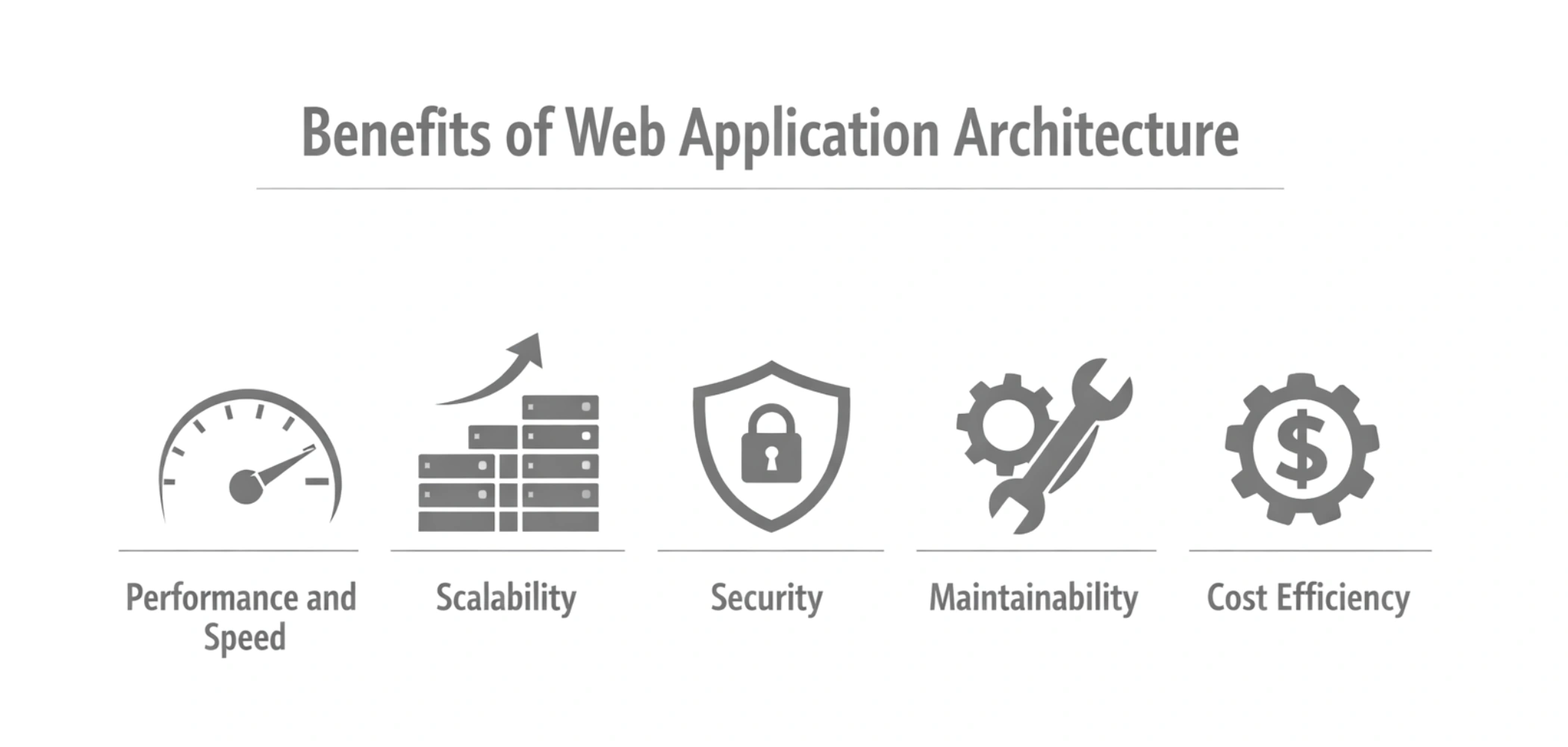
A well-designed architecture shapes how a web application performs, scales, stays secure, and evolves over time. It directly influences user experience, development efficiency, and long-term business value.
-
Performance and Speed
Application architecture determines how quickly requests are processed and responses are delivered. Optimized server communication, efficient caching, and proper load distribution reduce latency and improve overall application responsiveness.
-
Scalability
As user demand grows, applications must handle increased traffic without performance degradation. A scalable web architecture allows systems to expand resources smoothly, ensuring consistent performance during traffic spikes and business growth.
-
Security
Security must be built into the foundation, not added later. A strong web application security architecture protects sensitive data through authentication, authorization, encryption, and controlled access across all application layers.
-
Maintainability
A clean separation between the frontend, backend, and data layers makes applications easier to update and debug. Well-structured architecture reduces technical debt and allows teams to roll out new features faster.
-
Cost Efficiency
Efficient architecture minimizes infrastructure waste and development rework. By reducing performance issues and maintenance overhead, organizations gain long-term benefits of web app development through lower operational costs and improved ROI.
Core Components of Web Application Architecture
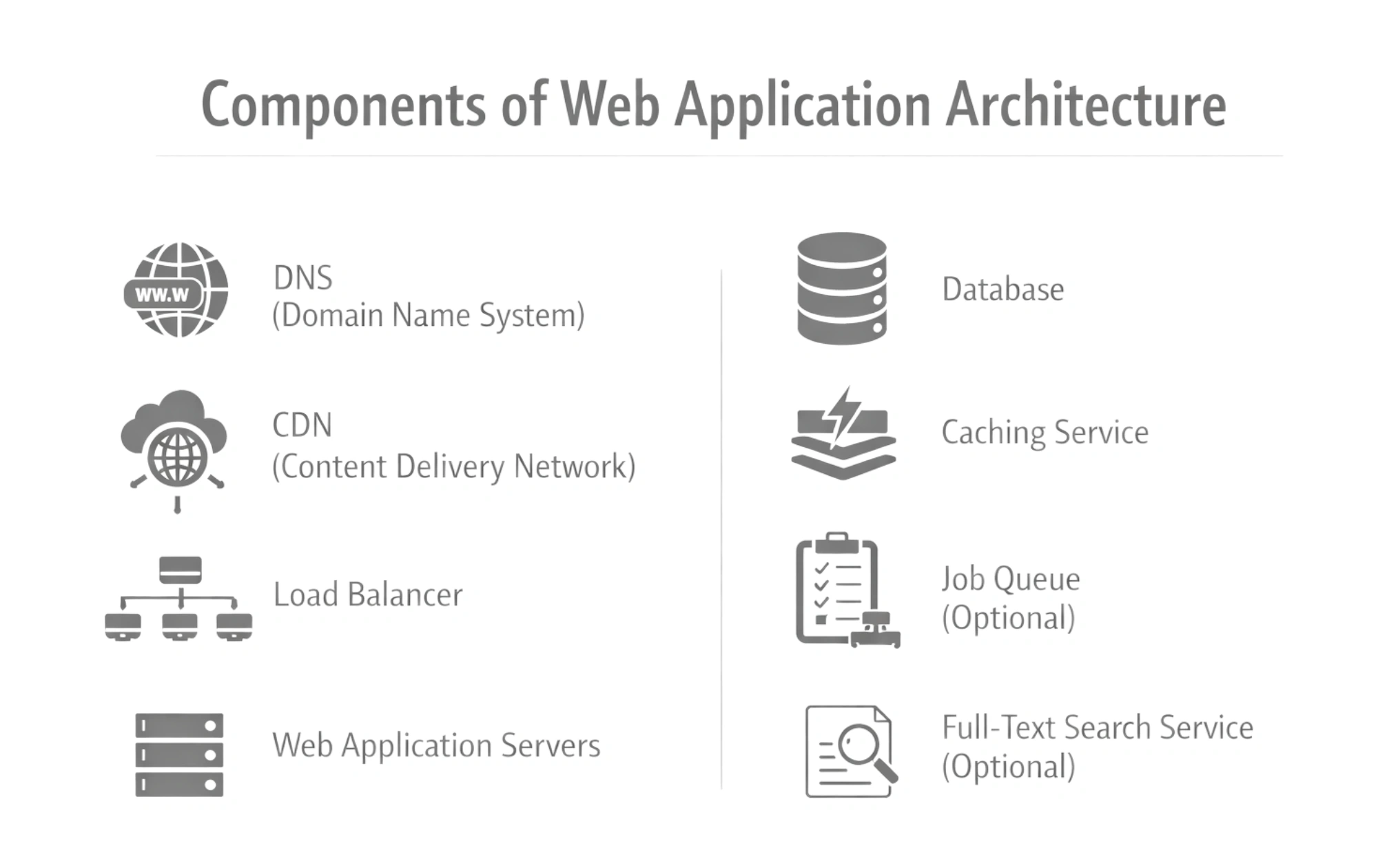
Every web application relies on a set of interconnected components that work together to deliver performance, reliability, and scalability. Let’s understand the components that help maintain stability as usage and complexity grow.
-
DNS (Domain Name System)
DNS is the foundational component that allows users to access a web application using a readable domain name instead of an IP address. It ensures requests are routed to the correct server efficiently and reliably, even when infrastructure changes behind the scenes.
Key points:
- Maps domain names to IP addresses
- Supports redundancy and failover
- Improves reliability and accessibility
Example:
When a user enters a website URL, DNS resolves it to the correct server before the application begins loading.
-
CDN (Content Delivery Network)
A CDN enhances web application performance by delivering static assets from servers located closer to end users. This reduces latency, improves page load speed, and ensures consistent performance for geographically distributed audiences.
Key points:
- Serves static files from edge locations
- Reduces latency and bandwidth usage
- Improves global user experience
Example:
Images, CSS, and JavaScript files are loaded from the nearest CDN server instead of the main application server.
-
Load Balancer
A load balancer distributes incoming user requests across multiple application servers to prevent overload and downtime. It ensures high availability by rerouting traffic when a server fails and enables smooth horizontal scaling.
Key points:
- Distributes traffic evenly
- Prevents single points of failure
- Supports high availability and scaling
Example:
During peak traffic hours, a load balancer directs requests across several servers to maintain fast response times.
-
Web Application Servers
Web application servers process client requests and execute business logic. They handle authentication, data validation, API responses, and integrations with external services. This layer forms the core of the system’s web services architecture, enabling seamless communication between frontend interfaces and backend systems.
Key points:
- Executes business logic
- Manages APIs and integrations
- Handles authentication and sessions
Example:
When a user submits a form, the application server validates the data and processes it before returning a response.
-
Database
The database is responsible for storing, retrieving, and managing application data such as user records, transactions, and system configurations. A well-designed web application database architecture ensures data consistency, high availability, and efficient query performance as the application scales.
Key points:
- Stores structured and unstructured data
- Supports backups and replication
- Ensures data integrity and reliability
Example:
An eCommerce application stores product details, orders, and customer information in its database for real-time access.
-
Caching Service
Caching services store frequently accessed data in memory to reduce response time and minimize database load. By serving repeated requests quickly, caching improves performance and supports scalability in high-traffic environments.
Key points:
- Reduces latency
- Decreases database queries
- Improves application performance
Example:
User session data is cached, so repeat requests load instantly without querying the database every time.
-
Job Queue (Optional)
Job queues manage background tasks that should not block user interactions. They allow applications to process tasks asynchronously, improving responsiveness and system stability.
Key points:
- Handles background processing
- Improves user experience
- Supports task prioritization
Example:
Order confirmation emails are sent through a job queue after a purchase is completed.
-
Full-Text Search Service (Optional)
Full-text search services enable fast, accurate searches across large volumes of data. They index content efficiently, making search functionality scalable and responsive.
Key points:
- Enables quick content discovery
- Handles large datasets efficiently
- Improves navigation and usability
Example:
A content platform allows users to instantly find articles using keyword-based search.
In a cloud based web application architecture, these components are often deployed as managed services, enabling scalability, fault tolerance, and reduced operational overhead while supporting modern, high-performance applications.
What is a 3 Tier Web Application Architecture?
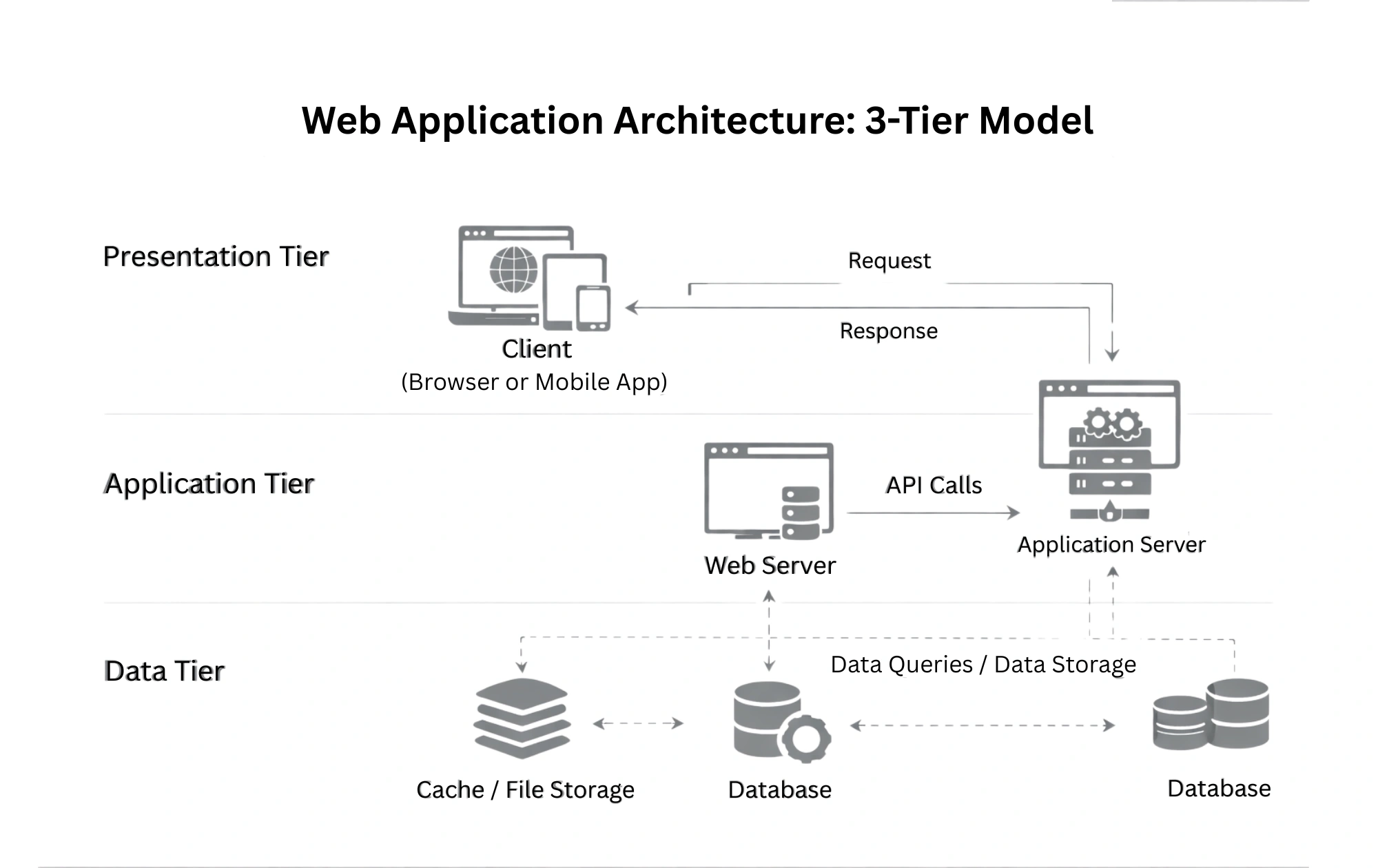
A 3-tier web app architecture is a widely adopted model that separates an application into three logical layers, each with a distinct responsibility. This separation improves maintainability, scalability, and security, making it a standard web application architecture for many business and enterprise systems. By isolating concerns, teams can update or scale one layer without directly impacting the others.
-
Presentation or Client Layer (Frontend)
This layer handles user interaction and presentation. It displays data to users, captures input, and sends requests to the application layer through the browser or client interface.
-
Logic Layer (Application/Business Logic)
The logic layer processes user requests, applies business rules, manages workflows, and communicates with the data layer. It acts as the brain of the application.
-
Data Layer (Database)
This layer is responsible for securely and efficiently storing, retrieving, and managing application data.
A web application architecture diagram of the 3-tier model clearly illustrates how requests move from the frontend to the logic layer and finally to the database before returning responses to users.
Modern Web Application Architecture Layers
Modern applications are built using clearly defined layers that separate user experience, business logic, and data management. This layered approach improves scalability, flexibility, and long-term maintainability across different use cases and platforms.
1. Frontend (Client-Side)
The frontend layer is responsible for everything users see and interact with directly in the browser. It focuses on usability, responsiveness, and performance, and is a critical part of modern web application architecture.
-
HTML, CSS, JavaScript
These core technologies structure content, define visual styles, and enable interactivity. Together, they ensure consistent experiences across devices and browsers while supporting responsive design principles.
-
Single-Page Applications (SPA)
SPAs load a single HTML page and dynamically update content without full page reloads. This approach improves speed and user experience, especially for dashboards and interactive platforms. Frontend layers also support progressive web apps, enabling offline access, faster load times, and an app-like experience on the web.
2. Backend (Server-Side)
The backend layer handles all server-side operations and acts as the brain of the application. It processes requests, enforces business rules, and ensures secure communication between systems, shaping the overall architecture of modern web applications.
-
Server
Servers receive requests from the frontend, manage sessions, and route traffic to the appropriate services. They ensure stability and availability under varying workloads.
-
Application logic
This component defines how data is processed, validated, and transformed. It controls workflows, permissions, and integrations with external systems.
-
APIs
APIs enable structured communication between frontend and backend systems and third-party services. In advanced use cases, APIs also support web architecture for AI, allowing applications to interact with machine learning models and intelligent services.
3. Database Layer
The database layer is responsible for storing, retrieving, and managing application data efficiently. It ensures data reliability, performance, and scalability as applications grow.
-
Relational databases (SQL)
SQL databases use structured schemas and relationships, making them ideal for transactional systems, financial applications, and scenarios requiring strong data consistency.
-
NoSQL databases:
NoSQL databases offer flexible schemas and horizontal scalability. They are well-suited to high-volume data, real-time applications, and systems that handle unstructured or semi-structured information.
Difference Between Legacy and Modern Web Application Architecture
Legacy and modern architectures differ significantly in how they handle scalability, flexibility, and evolving business needs. Understanding these differences helps organizations modernize systems and align technology with long-term growth goals.
| Aspect | Legacy Web App Architecture | Modern Web App Architecture |
| System Design | Tightly coupled components with limited modularity | Loosely coupled, modular design using services |
| Scalability | Vertical scaling with hardware limitations | Horizontal scaling using cloud-native resources |
| Deployment Model | Manual or infrequent deployments | Automated CI/CD pipelines and rapid releases |
| Technology Stack | Monolithic frameworks and outdated tools | Microservices, containers, and APIs |
| Maintenance | High effort and longer update cycles | Easier updates with independent services |
| Enterprise Readiness | Limited flexibility for growth | Designed for enterprise web application architecture needs |
| Innovation | Slow adoption of new features | Rapid adoption of web application trends like cloud, AI, and automation |
Modern architectures enable organizations to adapt faster, scale efficiently, and deliver consistent user experiences while reducing technical debt and operational risk.
Types of Web Application Architecture
Web applications can be structured in different ways depending on how responsibilities are distributed between the client, server, and infrastructure. These web application architecture patterns help teams design systems that balance performance, scalability, and maintainability based on specific business and technical needs.
-
Client-Side Architecture
Client-side architecture focuses on how content, navigation, and user interactions are structured and rendered in the browser. It combines web page architecture, which defines how individual pages are built and displayed, with web information architecture, which organizes content logically so users can easily find and understand information.
-
Single-Page Application Architecture
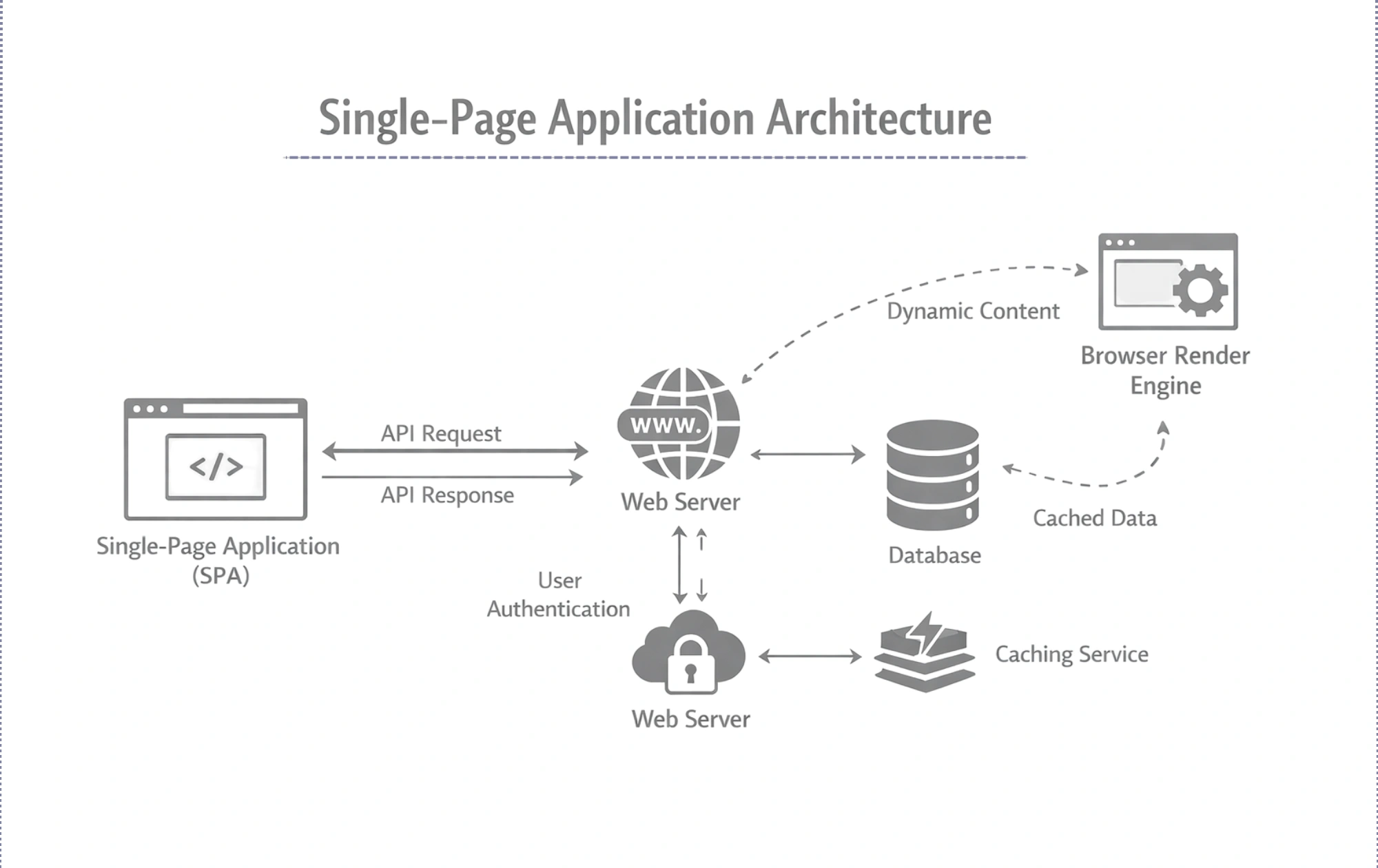
A single-page application architecture loads a single HTML page and dynamically updates its content as users interact with the application. Most processing happens on the client side, while the backend primarily exposes APIs. This approach creates a smooth, app-like user experience without frequent page reloads.
Advantages of Single Page Application:
- Faster navigation and improved user experience
- Reduced server load after initial page load
- Better support for interactive interfaces
Disadvantages of Single Page Application:
- Initial load time can be higher
- SEO requires additional optimization
- Heavy reliance on JavaScript
SPAs are commonly used for dashboards, social platforms, and applications that require real-time interaction.
-
Progressive Web App Architecture
Progressive Web App architecture enhances web applications with features traditionally associated with native apps. It uses modern browser capabilities to deliver offline access, push notifications, and improved performance. Many organizations adopt this model as part of their progressive web app development strategy to reach users across devices without separate mobile apps.
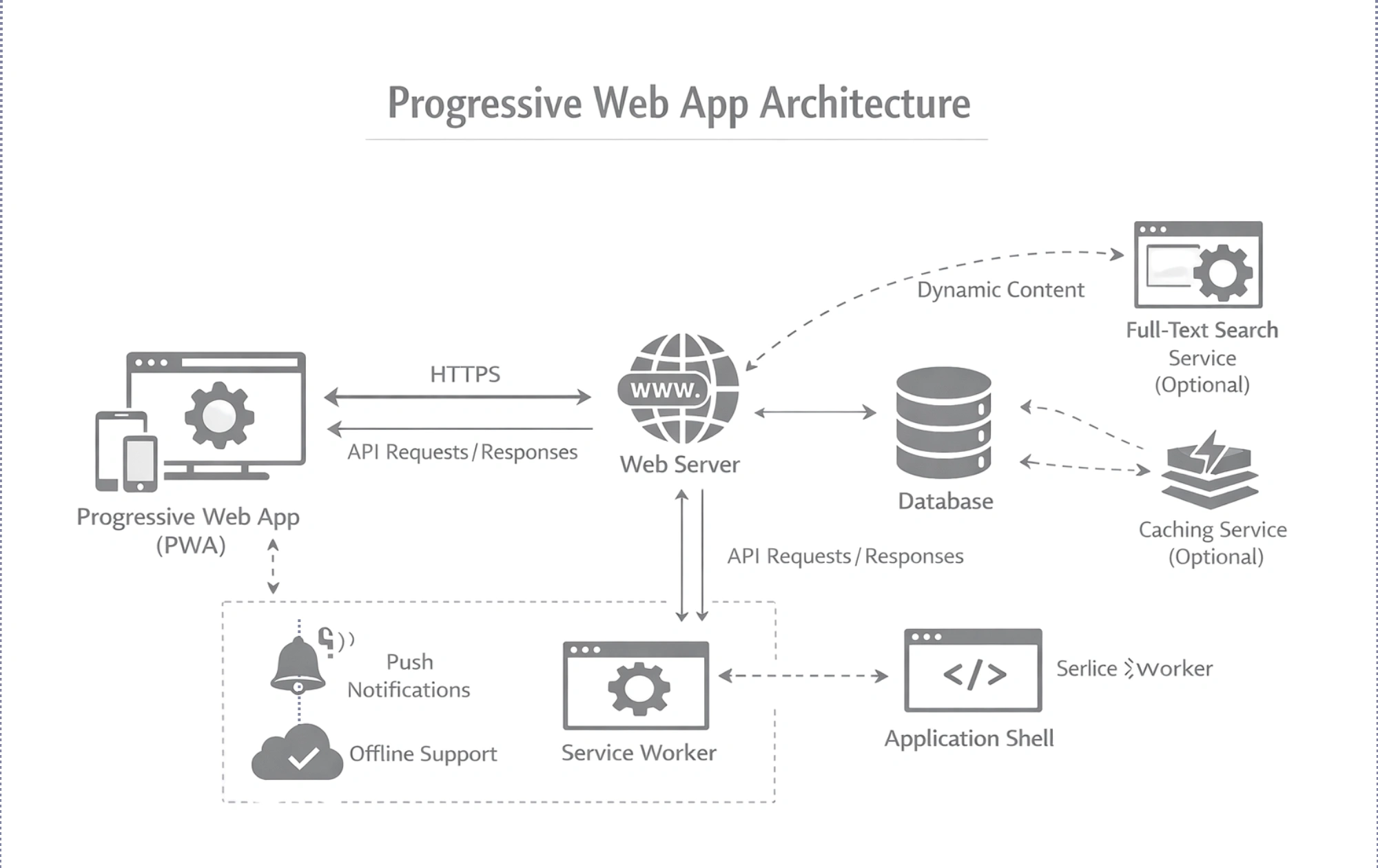
Advantages of PWAs:
- Works offline or on low networks
- App-like experience on the web
- No app store dependency
Disadvantages of PWAs:
- Limited access to some device features
- Inconsistent browser support
- Performance depends on caching strategies
PWAs are ideal for content-driven platforms and eCommerce applications.
-
Server-Side Architecture
Server-side architecture defines how backend systems process requests, manage data, and integrate services. It plays a critical role in scalability, security, and system reliability.
-
Microservice Architecture
Microservices architecture breaks an application into independent, loosely coupled services, each responsible for a specific function. Every service can be developed, deployed, and scaled independently, forming a flexible web application backend architecture suitable for complex systems.
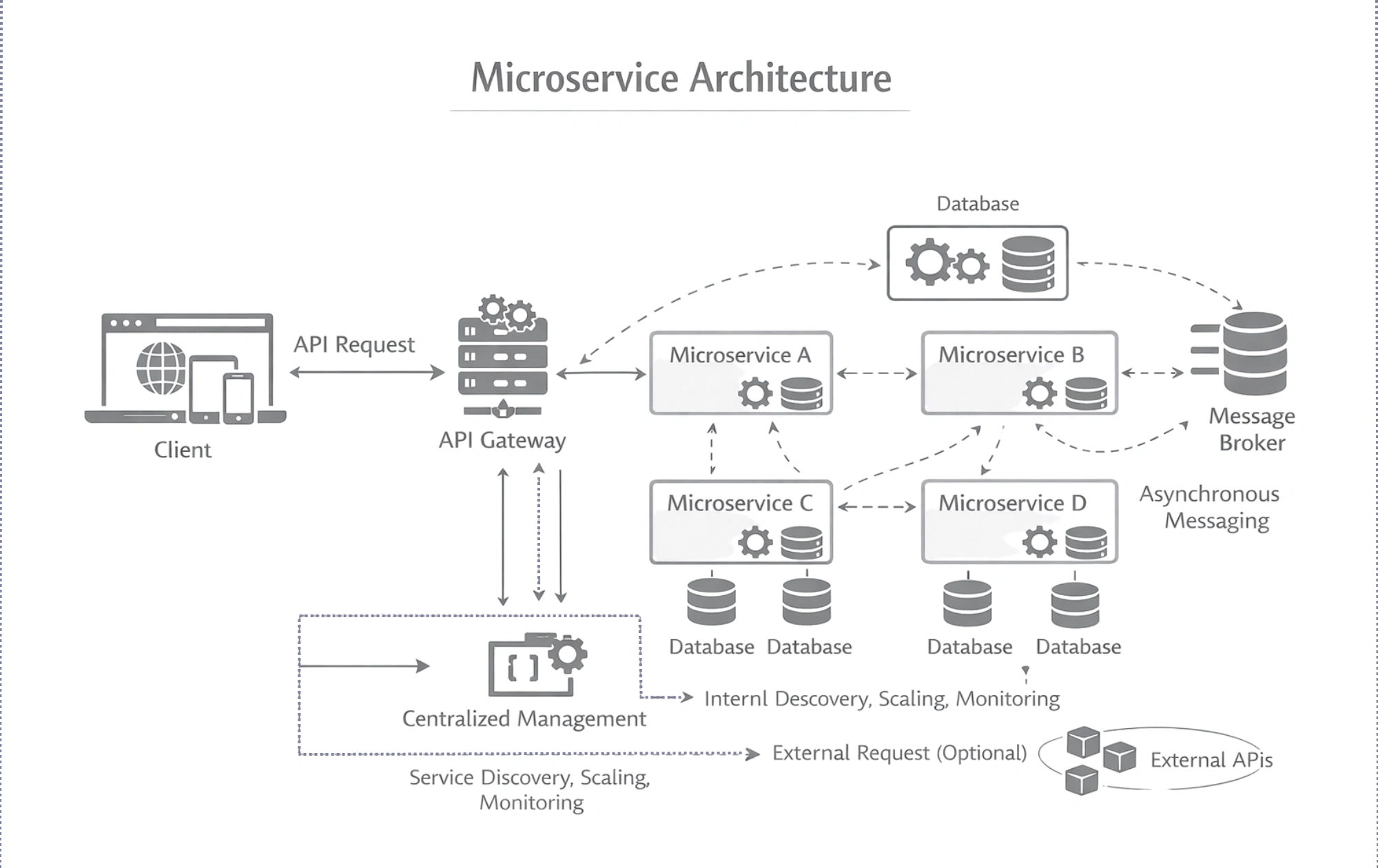
Advantages of Microservice Architecture:
- Independent scalability for each service
- Faster development and deployment cycles
- Better fault isolation
Disadvantages of Microservice Architecture:
- Increased infrastructure complexity
- Requires strong DevOps practices
- More challenging monitoring and debugging
Microservices are widely used in large-scale platforms where different teams manage distinct application capabilities.
-
Hosting & Deployment Architecture
Hosting and deployment architecture determines how applications are executed and scaled in production environments.
-
Serverless Architecture
Serverless architecture allows developers to run application logic without managing servers. In a serverless architecture for web application, cloud providers automatically handle infrastructure, scaling, and availability, while developers focus on writing functions.
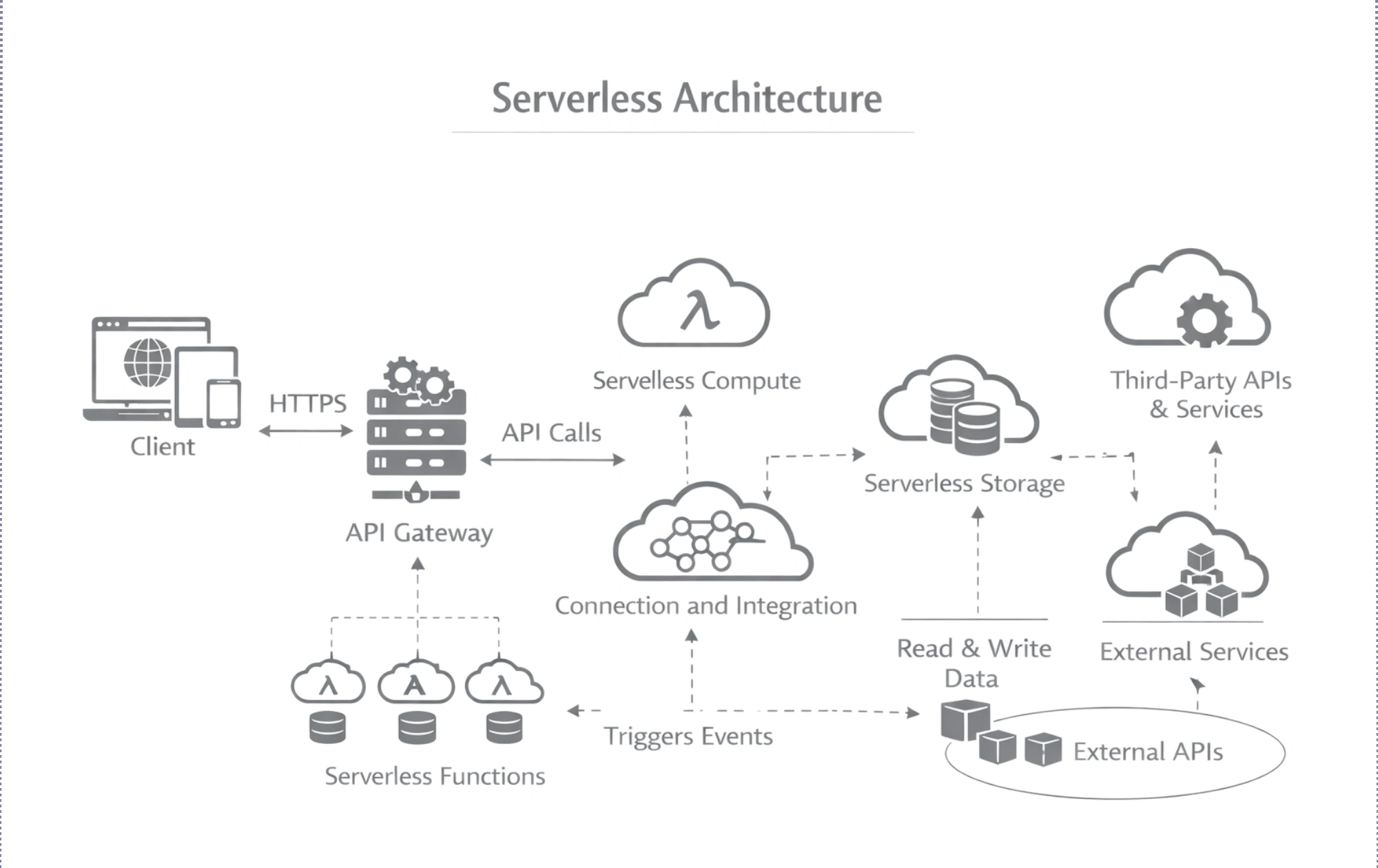
Advantages of Serverless Architecture:
- Automatic scaling based on demand
- Pay only for actual usage
- Faster development and deployment
Disadvantages of Serverless Architecture
- Cold start latency
- Vendor lock-in concerns
- Limited control over infrastructure
Serverless is best suited for event-driven applications, APIs, and workloads with unpredictable traffic patterns.
Advanced and Scalable Web Architecture Tools
Modern web applications rely on specialized tools to handle scale, performance, and reliability. These tools help systems manage growing data volumes, high traffic, and complex workloads while maintaining consistent user experiences.
-
Data Storage Tools
Advanced data storage tools support structured and unstructured data while ensuring availability and performance at scale. In large systems, such as web crawler architecture, storage solutions must efficiently handle massive data ingestion, indexing, and retrieval without slowing down application performance.
-
Load Balancing Tools
Load balancing tools distribute incoming traffic across multiple servers to avoid overload and downtime. In an AWS web application architecture, managed load balancers automatically route requests, detect unhealthy instances, and maintain high availability during traffic spikes or failures.
-
Caching and Content Delivery Tools
Caching and content delivery tools reduce latency by serving frequently accessed data closer to users. They play a key role in cloud application development, enabling faster response times, lower server load, and improved scalability for globally distributed applications.
How to Choose the Best Web Application Architecture 150 words
Selecting the right architecture requires balancing business goals, technical requirements, and future growth. A well-informed decision ensures performance, scalability, and maintainability without unnecessary complexity or cost.
-
Understand Business and User Requirements
Begin by identifying core business objectives, target users, and expected traffic patterns. Applications with high user interaction, real-time features, or rapid growth demand different architectural approaches than simple content-driven platforms.
-
Evaluate Scalability and Performance Needs
A thoughtful web architecture design should support both current workloads and future expansion. Consider how the application will handle traffic spikes, data growth, and feature additions without affecting performance.
-
Assess Technical Complexity and Team Expertise
Architecture choices should align with your development team’s skills. Overly complex systems can increase maintenance effort and slow down development if the required expertise is unavailable.
-
Consider Cost and Long-Term Sustainability
Infrastructure and maintenance expenses vary by architecture. Understanding the website design and development cost helps in choosing a solution that delivers value while remaining financially sustainable over time.
Web Application Architecture Best Practices
Following proven architectural principles helps teams build reliable, scalable, and secure applications. These best practices of web app architecture ensure systems remain adaptable, performant, and easy to maintain as business needs evolve.
- Design with scalability in mind from the start
- Separate frontend, backend, and data layers clearly
- Use APIs to enable loose coupling between services
- Implement caching to reduce latency and server load
- Secure every layer with authentication and access control
- Optimize database queries and data storage strategies
- Monitor performance and system health continuously
- Automate deployments and infrastructure management
- Plan for fault tolerance and graceful failure handling
This approach reduces technical debt, improves development efficiency, and creates a strong foundation for long-term application growth and stability.
Why Choose SparxIT for Web App Architecture Development?
SparxIT helps businesses build robust and scalable digital solutions by focusing on performance, security, and long-term growth. Its expertise in enterprise web app architecture enables organizations to design systems that support complex workflows and evolving business demands.
Why businesses trust SparxIT:
- Deep experience in architecting enterprise-grade web applications
- Strong focus on scalability, security, and performance optimization
- Clear separation of frontend, backend, and data layers
- Architecture designed for easy maintenance and future enhancements
- Proven delivery across diverse industries and use cases
By combining strategic planning with technical excellence, SparxIT delivers solutions that align technology with business goals. Organizations looking for reliable custom web app development benefit from well-structured architectures, modern technology stacks, and a commitment to building applications that scale smoothly over time.

Partner with Experts
Frequently Asked Questions
What is web application backend architecture?


Web application backend architecture defines how servers, APIs, databases, and business logic work together. It handles data processing, authentication, integrations, and communication with the frontend to deliver application functionality.
What is a web application architecture example?
A common example includes a browser-based frontend, an application server that processes requests, and a database that stores user and system data, all connected through APIs.
How is web architecture for AI different from traditional web architecture?
AI-focused architecture includes additional components such as data pipelines, model inference services, and large-scale storage, enabling real-time predictions and intelligent decision-making.
Which is the best standard web application architecture?
There is no single best option. The 3-tier architecture is widely used, but the ideal choice depends on scalability, complexity, and business requirements.
Can one web application architecture pattern fit all use cases?
No. Different applications require different patterns based on traffic, performance needs, and future growth plans.
Can web app architecture change over time?
Yes. Many applications start simple and evolve into more scalable architectures as user demand and functionality grow.