Most framework comparisons read like shopping lists. They rank technologies, repeat feature bullets, and end with a table implying every option is interchangeable. For enterprise application development, that’s the wrong decision model.
Enterprises aren’t simply choosing between cross-platform and native development. They’re deciding which architecture, code-sharing model, and framework ecosystem best align with their software, security requirements, platform needs, and long-term technology strategy.
Cross-platform app development frameworks influence more than development speed. They affect time to market, staffing, security posture, platform access, testing complexity, technical debt, and total cost of ownership over the application’s lifecycle.
This guide examines the leading framework options, explains how their architectures differ, and shows how to evaluate them against real enterprise requirements. It also assesses the risks that can turn an efficient pilot into a costly modernization or rebuild.
The goal isn’t to declare a universal winner, but to give CIOs, CTOs, and leaders a way to evaluate framework choices based on architecture, cost, security, performance, organizational fit, and long-term viability rather than a feature list alone.
| Executive Takeaway: Choose the architecture before the framework. Decide what should be shared, what must remain native, and what the choice will cost over the application’s lifecycle. |
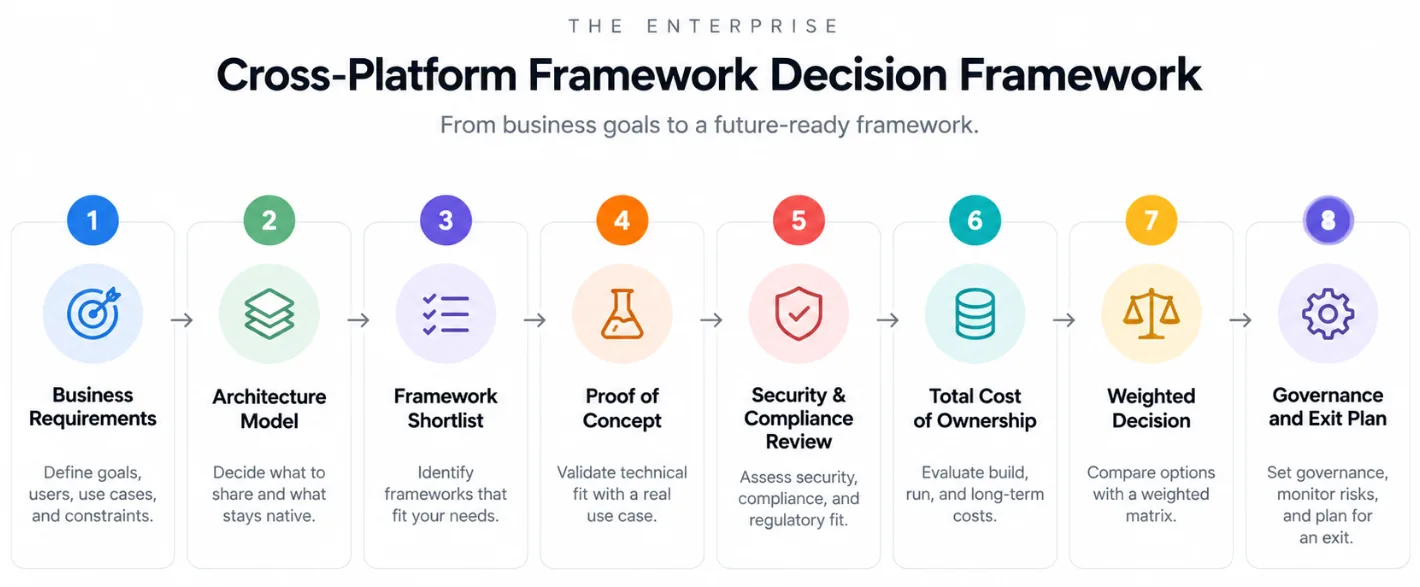
Key Takeaway:
|
Why Cross Platform Framework Selection Matters?
Selecting an enterprise mobile app development framework is a long-term technology decision. It shapes the software product engineering model, governance approach, talent strategy, and cost structure that support the application for years.
A framework decision can set the ceiling on delivery speed for future initiatives, shape talent strategy for years, and determine how exposed the organization is if a framework’s maintainer changes direction.
Microsoft’s transition from Xamarin to .NET MAUI illustrates why framework lifecycle risk deserves attention. The lesson isn’t that one framework is unsafe; it’s that enterprises need to evaluate maintainer commitment, migration paths, and treatment of existing customers before standardizing on any technology stack.
What technology leaders should own
- The architectural trade-off between shared code and native implementation.
- The cost model across initial delivery and ongoing operation.
- Security, compliance, and dependency governance.
- Talent availability, training requirements, and team topology.
- Framework maturity, roadmap visibility, and end-of-life exposure.
- The organization’s migration and exit strategy.
Look Beyond the Feature Checklist
A feature matrix shows whether a framework supports a capability. It can’t determine
- whether that capability is easy to maintain
- whether the team can staff it
- whether the framework remains a good fit five years out
Those questions require an architecture and governance lens.
Understanding Cross Platform Mobile App Development Frameworks
Cross-platform app development lets product development teams build for multiple operating systems from a shared codebase or shared components, instead of maintaining fully separate Android and iOS implementations. Teams can reuse business logic, UI components, data layers, and integrations, but how much they share depends entirely on the framework.
Some technologies prioritize maximum code sharing across the full application. Others let developers share selected layers, such as networking or authentication, while keeping native code for platform-specific functionality. Cross-platform app development frameworks aren’t one model; they’re a spectrum of trade-offs between reuse and control.
Enterprises that treat cross-platform as a single, uniform category make the comparison harder than it needs to be. Separate the question into “what layer is shared” and “how much is shared,” and the framework becomes far easier to navigate and defend in an architecture review.
How Cross Platform App Development Frameworks Differ
Before comparing individual tools, it helps to understand the three broad approaches enterprises choose between:
- Shared UI and application code: Flutter and React Native let teams share substantial portions of the application, accelerating development where a consistent cross-platform experience matters more than a platform-native look and feel.
- Shared business logic with native UI: Kotlin Multiplatform shares logic, networking, and data layers while keeping native interfaces, or shares UI as well through Compose Multiplatform. This avoids an all-or-nothing decision.
- Web-based cross-platform development: Ionic, Framework7, and Apache Cordova use HTML, CSS, and JavaScript, which suits organizations with mature web teams but carries different performance and platform-integration characteristics than compiled frameworks.
Cross-Platform vs. Native App Development
Native development uses platform-specific languages, Kotlin or Java for Android, Swift or Objective-C for iOS, giving teams direct access to platform APIs and full control over per-OS optimization. Cross-platform development app development frameworks introduce a shared layer that reduces duplication between the two.
The cross platform vs native mobile app development decision is not simply about which approach costs less upfront. Native tends to win when an application needs highly platform-specific UX, advanced graphics, deep OS integration, specialized hardware, or immediate access to brand-new platform APIs.
Cross-platform tends to win when both Android and iOS are required, meaningful functionality can be shared, consistent UX matters, or time to market and engineering capacity are tight.
A hybrid app development strategy often works best in practice with shared business logic while keeping native UI layers, an architecture Kotlin Multiplatform is explicitly built to support.
The practical benefits and trade-offs
- Reduced duplication across development teams.
- Faster feature delivery when functionality can genuinely be shared.
- Greater consistency across platforms where a common UI model is desirable.
- Simplified application maintenance for common functionality.
- Broader reuse of existing engineering skills.
- New dependencies on the selected framework and its ecosystem.
- Potentially more platform-specific AI integration and security testing than a single shared-codebase narrative suggests.
| Key Insight: Code sharing is an architectural lever, not a success metric on its own. The goal is the right boundary between shared and native code. |
10 Best Cross Platform App Development Frameworks
The cross-platform frameworks for enterprise mobile applications evaluated most often today, spanning native-first technologies to established web-based toolkits. Each profile covers the core technology, key strengths, and best enterprise fit among today’s leading mobile app development frameworks.
1. Kotlin Multiplatform
Kotlin Multiplatform is an open-source technology from JetBrains that lets teams share Kotlin code across platforms while retaining native capabilities. Its defining advantage is flexibility: an enterprise can share networking, authentication, data models, and business logic while keeping native interfaces, or expand sharing with Compose Multiplatform.
You can hire Kotlin developers who can also extend sharing into the UI layer through Compose Multiplatform. This makes KMP different from an all-or-nothing model. You can shape the architecture around the parts of the application that genuinely benefit from reuse.
Key strengths
- Strong native interoperability
- Kotlin-based development
- Incremental adoption
- Native UI option
- Shared UI option
- Targets spanning Android, iOS, desktop, web, and server-side environments
Enterprise fit
Particularly compelling for enterprises with substantial Kotlin or Android expertise and for organizations modernizing a legacy native application without replacing it wholesale.
What to Evaluate
The main evaluation question is not simply how much code KMP can share. Teams should determine which layers should remain native, how shared modules will be versioned, how ownership will be divided between platform teams, and whether the organization has enough Kotlin and iOS capability to operate the resulting architecture over several years.
2. Flutter
Flutter is Google’s open-source framework for multi-platform application development using Dart and its own rendering approach. Flutter app development gives teams tight control over UI consistency and supports platform-specific integrations through plugins or custom native code.
Key strengths
- Single Dart codebase
- Strong UI consistency
- Rich widget ecosystem
- Fast development workflow
- Broad platform support
- Native/plugin integration
Enterprise fit
Well suited to customer-facing products where consistent UI, rapid iteration, and broad code reuse matter, including digital banking, retail, travel, commerce, portals, and dashboards. Benchmark performance for advanced graphics, media, intensive animation, and specialized hardware.
3. React Native
React Native combines JavaScript or TypeScript development with React and a native platform integration model. React Native app development architecture uses JSI rather than the older asynchronous bridge model described in many legacy comparisons. The result is a framework that can share substantial application code while retaining access to native capabilities when the standard abstraction is insufficient.
Key strengths
- JavaScript/TypeScript
- React ecosystem
- Broad developer community
- Significant code reuse
- Native platform integration
- Established enterprise adoption
Enterprise fit
A strong candidate for enterprises with large React teams and for consumer, ecommerce, collaboration, customer-engagement, and internal applications.
What to Evaluate
The enterprise evaluation should focus on the application’s native requirements, dependency health, testing model, and the amount of platform-specific code expected over time. A large JavaScript talent pool can reduce staffing friction, but it does not remove the need for engineers who understand iOS and Android behavior when the product moves beyond standard framework capabilities.
4. .NET MAUI
.NET MAUI provides a single-project development model built around C# and XAML. It lets organizations share application logic and UI while adding platform-specific code where needed. The framework connects mobile and desktop development within the broader .NET ecosystem.
Key strengths
- C# and .NET
- Shared project structure
- Visual Studio integration
- Platform-specific code
- Shared business logic and UI
Enterprise fit
Particularly relevant to organizations standardized on C#, .NET, Azure, Microsoft identity services, Visual Studio, and Windows enterprise applications, especially where mobile and desktop products need to coexist.
What to Evaluate
Enterprises should assess platform-specific requirements, application performance, testing coverage, available internal skills, and the framework’s fit with existing .NET development architecture standards.
5. Ionic
Ionic is built around web technologies such as HTML, CSS, and JavaScript and can work with popular web frameworks. You can access native capabilities through integrations such as Capacitor. This gives organizations a web-first route into mobile rather than requiring a separate mobile language ecosystem.
Key strengths
- Web technology foundation
- Familiar development model
- Strong web-framework integration
- Reusable web skills
- Native access through plugins/integrations
Enterprise fit
Attractive for business applications, workforce apps, customer portals, content-driven products, and web application modernization.
What to Evaluate
Web-based runtime characteristics should be tested against the actual application. Teams should pay particular attention to demanding interactions, device APIs, offline behavior, memory, startup, and hardware-intensive features.
6. NativeScript
NativeScript allows JavaScript or TypeScript teams to build mobile applications while working with native UI components and platform capabilities. Its approach differs from a conventional web wrapper because the framework is designed around direct interaction with native mobile functionality.
Key strengths
- JS/TS
- Native UI
- Platform API access
- Cross-platform sharing
- Familiar language
Enterprise fit
Can fit teams seeking native integration without leaving JavaScript/TypeScript. For a strategic multi-year enterprise standard, assess ecosystem activity, library availability, support, and maintainability closely.
What to Evaluate
The supplied source material specifically calls for scrutiny of ecosystem activity, available libraries, support requirements, and long-term maintainability. Test those factors against the organization’s critical dependencies before making a multi-year commitment.
7. Uno Platform
Uno Platform uses C# and XAML and extends a .NET-oriented development model across a broad set of targets, including Android, iOS, WebAssembly, macOS, Linux, and Windows. It supports shared UI and application logic.
Key strengths
- Broad platform targeting
- WebAssembly
- Shared UI and application logic
- .NET alignment
Enterprise fit
Relevant where desktop, mobile, and web targets need a common .NET-oriented model, especially when WebAssembly is strategically important. Assess platform-specific requirements and ecosystem maturity for each target.
What to Evaluate
The supplied material recommends analyzing platform-specific requirements before standardization. Enterprises should therefore validate every target they intend to support, rather than treating broad platform coverage as equivalent to identical production readiness across all surfaces.
8. Qt
Qt is a mature cross-platform framework with a strong C++ foundation and a history spanning desktop, mobile, embedded, and specialized environments. Its value extends beyond conventional mobile development because it supports applications that need to operate close to hardware and across multiple device classes.
Key strengths
- C++ ecosystem
- Desktop and embedded support
- Rich UI
- Hardware/device integration
- Broad reach
Enterprise fit
Especially relevant to automotive, industrial automation, medical devices, consumer electronics, and embedded systems. For conventional enterprise mobile applications, the C++ stack may create additional organizational complexity.
What to Evaluate
For conventional enterprise mobile applications, Qt may introduce a technology stack that differs from the organization’s existing mobile skills. The decision should therefore consider engineering capability, platform requirements, integration needs, and whether the broader desktop or embedded footprint justifies the additional stack complexity.
9. Framework7
Framework7 is built around web technologies and provides mobile-focused UI components for application development. It follows a web-based approach that lets teams use HTML, CSS, and JavaScript to build interfaces based on familiar mobile patterns.
Key strengths
- Web development
- Mobile UI components
- Familiar frontend technologies
- Hybrid support
- Rapid prototyping
Enterprise fit
Can fit simpler business apps, prototypes, internal tools, and conventional mobile interactions. Compare highly performance-sensitive enterprise applications with compiled or native-integrated alternatives through a proof of concept.
What to Evaluate
For demanding applications, a proof of concept should compare Framework7 against compiled or native-integrated alternatives. The evaluation should include startup, rendering, device integration, offline behavior, and any specialized capabilities that could move the application beyond a straightforward web-oriented workload.
10. Apache Cordova
Apache Cordova packages web applications for mobile platforms and exposes native device functionality through plugins. It represents a long-established hybrid model in which HTML, CSS, and JavaScript form the primary application layer.
Key strengths
- Mature hybrid model
- HTML/CSS/JavaScript
- historical ecosystem
- Web skill reuse
- Plugin-based native functionality
Enterprise fit
More relevant for maintaining or modernizing existing Cordova applications than for a new strategic enterprise standard. New-build decisions should compare performance, security, ecosystem health, and long-term support.
What to Evaluate
For a new build, enterprises should compare Cordova with newer architectures on performance, security, ecosystem health, native integration, and long-term support. For an existing Cordova estate, the more useful question may be whether to stabilize, modernize incrementally, or migrate to another architecture.
Cross-Platform Framework Comparison at a Glance
This cross platform app development frameworks comparison summarizes the technology, code-sharing approach, and strongest enterprise fit for each option. Treat it as a starting filter, not a ranking.
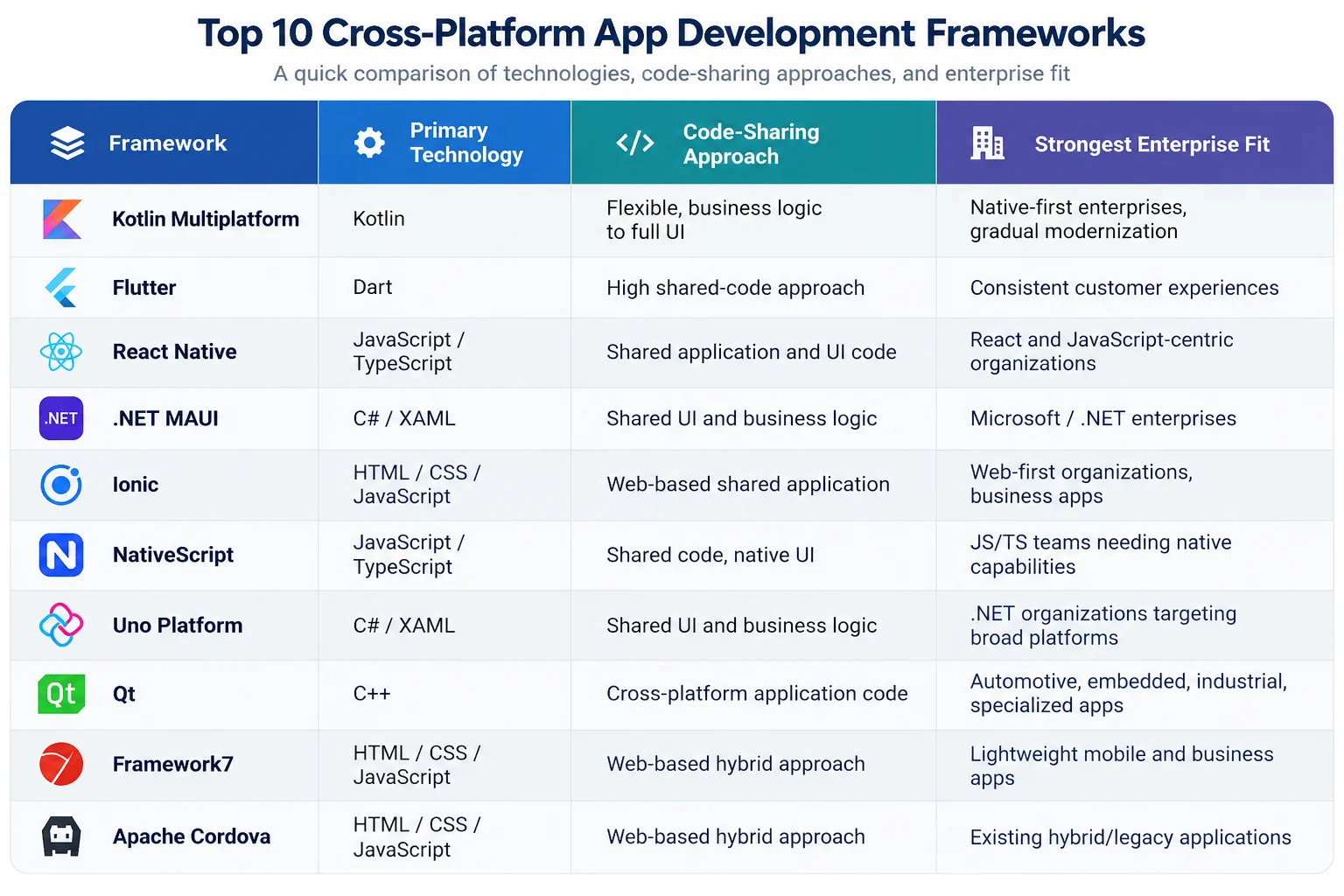
A framework that’s an excellent fit for a .NET enterprise development may be the wrong choice for a React-centric one, and vice versa. Popularity is not a selection criterion.
Common Enterprise Risks in Mobile App Development Frameworks
Four risks recur across enterprise cross-platform initiatives, regardless of which framework is chosen.
- Overestimating code reuse: Sharing code does not eliminate platform-specific work. The more an application depends on device-specific functionality, the more native integration it still requires.
- Dependency risk: Cross-platform projects lean on third-party packages, plugins, and native libraries. An abandoned dependency can trigger upgrade, security, and compatibility problems, so maintain a dependency inventory and evaluate package health before adopting anything critical.
- Framework lock-in: A framework becomes a strategic risk once leaving it means rebuilding the entire application. Document architecture boundaries, native integration points, dependencies, and data access layers to keep an exit strategy realistic.
- Platform update delays: Apple and Google introduce new platform capabilities continuously. A framework’s ability to expose new native functionality quickly should be part of the initial evaluation, not an afterthought.
Cross Platform App Development Cost and Total Cost of Ownership
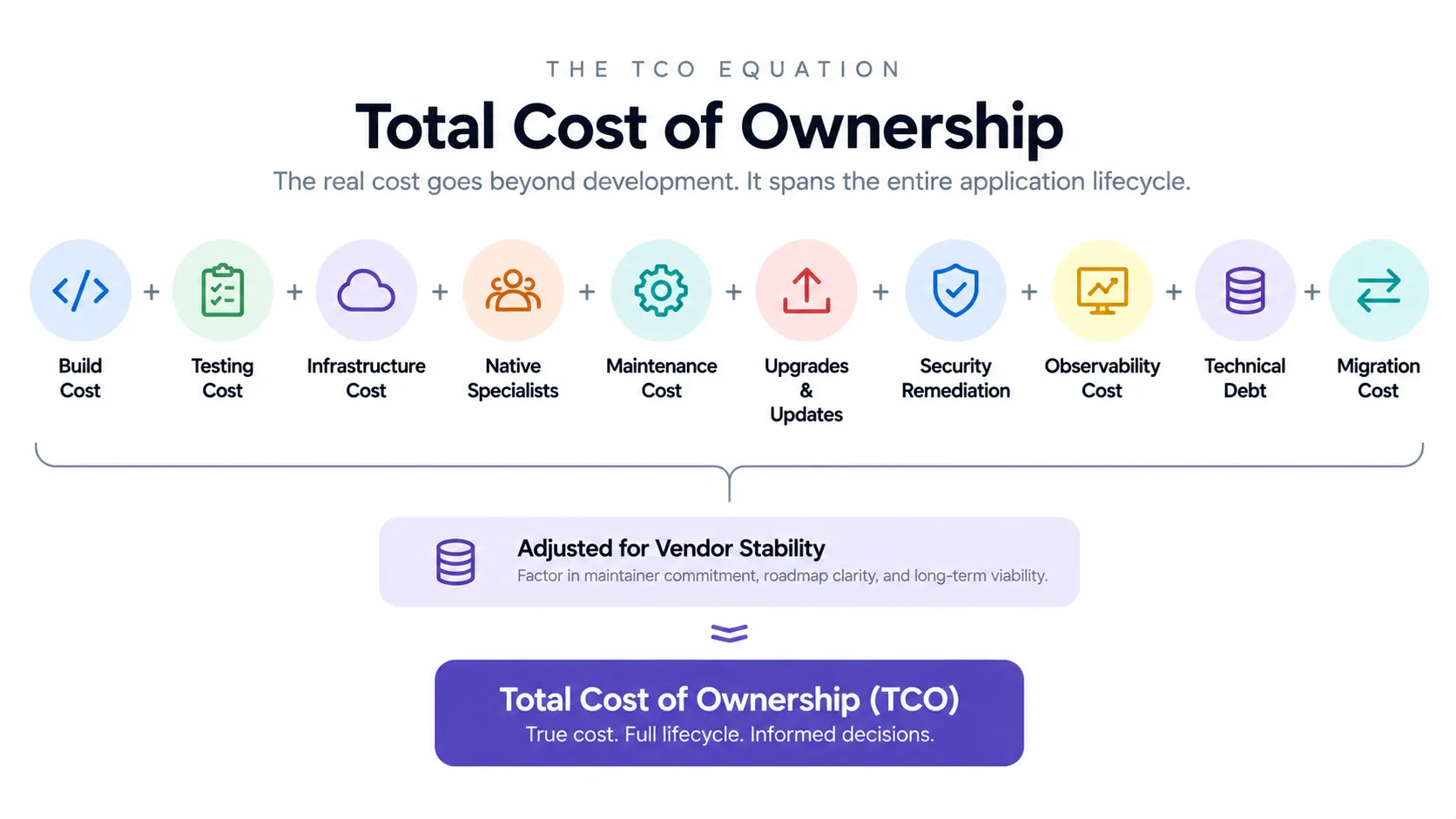
A realistic cross platform app development cost and TCO analysis includes both build and run phases.
Initial app development cost is only one part of framework economics. A framework that matches the skills already on staff can reduce ramp-up and onboarding costs, but the run phase can introduce expenses through OS updates, framework upgrades, native escape hatches, technical debt, testing infrastructure, and security remediation.
| App Complexity | Estimated Cost Range | Typical Scope |
| Simple | $25,000—$50,000 | Basic UI, user authentication, profiles, standard APIs, limited integrations, and core functionality |
| Medium | $50,000—$100,000 | Multiple user roles, custom UI/UX, third-party integrations, payments, notifications, analytics, and moderate backend complexity |
| Advanced | $100,000—$200.000 | Complex business logic, real-time features, AI/ML, advanced security, multiple integrations, offline capabilities, sophisticated backend, and enterprise requirements |
Build-phase cost drivers
- Team composition and existing skills.
- Ramp-up and onboarding time.
- CI infrastructure and device-testing services.
- Design-system or tooling costs.
- Native specialists required for platform-specific work.
Run-phase cost drivers
- Maintenance against operating-system changes.
- Framework version upgrades and breaking changes.
- Platform-specific escape hatches and accumulated technical debt.
- Dependency maintenance and migration effort.
- Security remediation and compliance work.
- Observability and production support.
A Practical Enterprise TCO formula
Model: TCO = build-phase cost + (annualized run-phase cost × expected app lifespan in years) + a vendor-stability risk adjustment.
The risk adjustment is not a market-price estimate. It is a governance factor that forces the organization to account for framework stability. The source material recommends scaling the factor upward for high-risk or declining frameworks and downward for technologies with strong first-party backing and a visible long-term roadmap.
What not to do
Do not compare cross-platform app development frameworks solely by development hours saved. If a framework creates expensive native work, difficult upgrades, a thin hiring market, or a costly eventual migration, those costs belong in the decision.
How to Choose the Best Framework for Cross-Platform App Development
The top frameworks for cross platform development depend on requirements, existing skills, native capability needs, and expected application lifespan.
1. Define target platforms
Identify Android, iOS, iPadOS, Windows, macOS, web, Linux, embedded systems, wearables apps, or specialized devices. The broader the platform footprint, the more important long-term platform support becomes.
2. Define the sharing boundary
Decide whether the organization should share business logic, data models, networking, authentication, state management, UI, validation, data analytics, testing utilities, or only selected modules.
3. Map native requirements
Identify biometrics, Bluetooth, NFC, GPS, camera, background processing, push notifications, secure storage, payments, wearables, advanced media, and device-management needs.
4. Establish measurable performance requirements
Define workload-specific benchmarks and test realistic workflows on representative devices.
5. Complete security and compliance review
Assess secure storage, authentication, authorization, cryptography, network security, secrets, dependencies, third-party SDKs, privacy, tamper resistance, logging, and monitoring. Map applicable regulatory obligations.
6. Assess the engineering ecosystem
Evaluate existing skills, hiring, training, developer productivity, IDEs, testing, architecture standards, backend alignment, and CI/CD pipeline.
7. Model lifecycle TCO
Include build, testing, cloud computing, native specialists, maintenance, upgrades, security remediation, observability, technical debt, migration, and vendor risk.
| Selection principle: Do not start with a target such as 90% code reuse. Start with the application and decide where sharing creates durable value. |
A Weighted Decision Matrix for Enterprise Mobile App Development Framework Selection
Pros-and-cons lists make every enterprise mobile app development framework look reasonable. A weighted matrix forces trade-offs into the open instead. Score each framework 1 to 5 against your own priorities, multiply by weight, and compare totals.
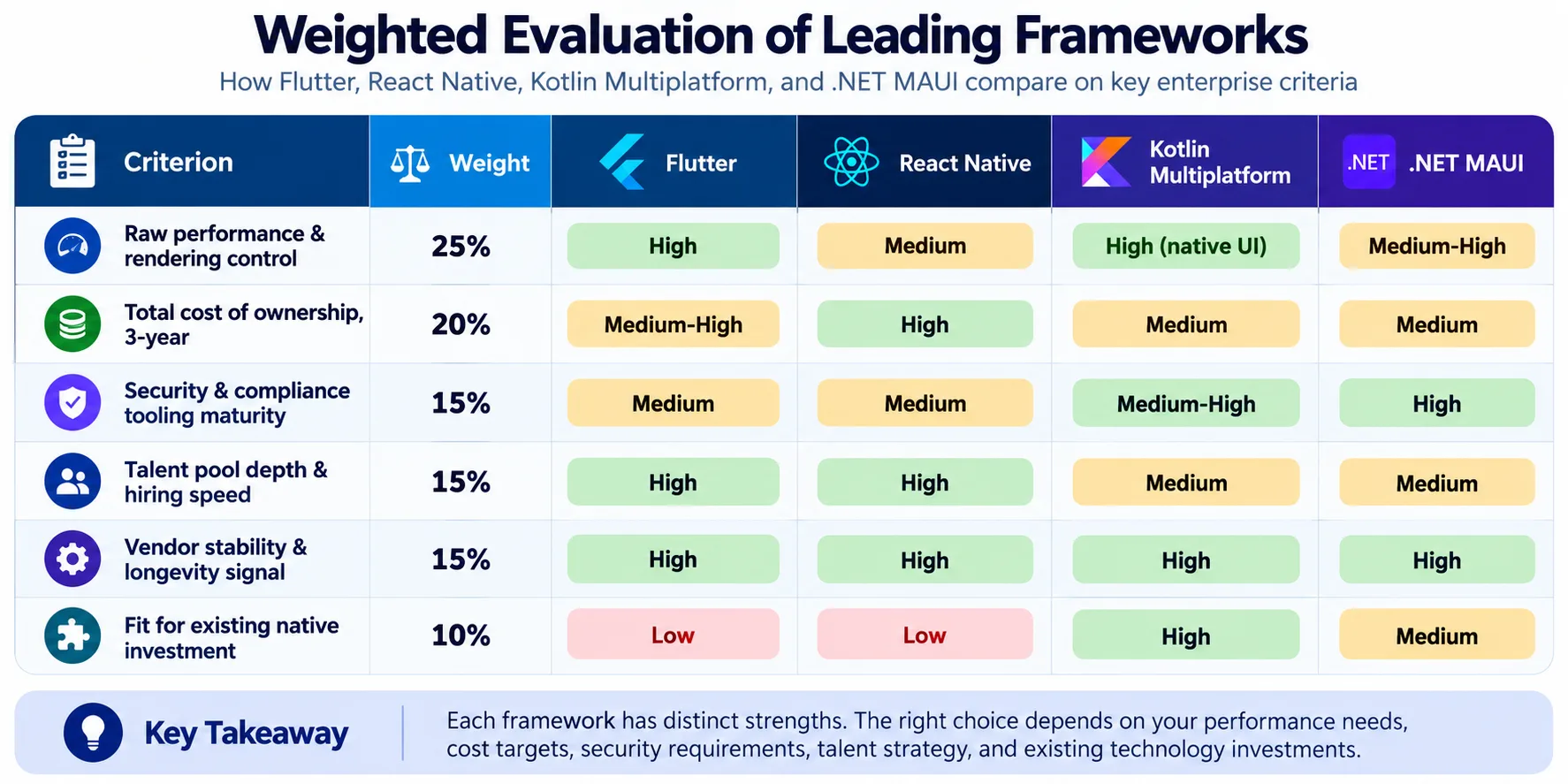
The output won’t replace judgment, but it will surface priority disagreements before they become a stalled project six months into development. Run the exercise with architecture, security, and engineering leadership in the same room, since the weights themselves are usually where the real disagreement lives, not the scores.
Checklist for Choosing the Right Cross Platform App Development Framework
- Does the framework support every required target platform?
- How much application code can realistically be shared?
- How easily can developers access native APIs?
- What happens when the framework does not support a required platform capability?
- Can the application meet its requirements?
- How mature is the ecosystem?
- How frequently is the framework updated?
- How healthy are critical dependencies and plugins?
- Does the organization already have the required engineering skills?
- How will applications be tested across devices and operating systems?
- How will CI/CD and application signing be managed?
- How will production crashes and performance issues be monitored?
- What security and compliance controls are required?
- What is the five-year total cost of ownership?
- What is the migration or exit strategy?
Conclusion
Cross-platform app development frameworks have moved beyond the old promise of writing one application once. Enterprise teams now have several architectural models for deciding what to share, what to keep native, and how broadly to extend a product across mobile, desktop, web, and specialized environments.
The strongest decision is not the framework with the longest feature list. It is the framework that fits the application’s architecture, the organization’s engineering capabilities, security and compliance obligations, performance expectations, platform strategy, and lifecycle economics.
Build Scalable Cross-Platform Apps with SparxIT
Build enterprise-grade cross-platform applications that deliver consistent experiences across iOS, Android, and other platforms. SparxIT combines modern frameworks, robust architecture, and enterprise-grade engineering to turn complex product requirements into reliable digital solutions.
From product strategy and UI/UX design to development, testing, deployment, and ongoing support, our teams manage the complete application lifecycle. We focus on performance, security, maintainability, and seamless integration with your existing technology ecosystem.
Whether you are launching a new product or modernizing a legacy application, SparxIT helps you choose the right cross-platform approach for your business goals. Create applications that are built for today’s users and ready to scale with tomorrow’s demands.

Partner with Experts
Frequently Asked Questions
Which framework has the lowest TCO?


There is no universal answer. TCO depends on existing skills, expected lifespan, platform-specific requirements, testing, upgrades, and technical debt. Android-heavy organizations may find Kotlin Multiplatform attractive, while teams starting from scratch may prefer Flutter or React Native depending on their priorities.
How do enterprises evaluate framework security and compliance?
Run an OWASP MASVS-aligned review covering areas such as storage, cryptography, authentication, and network communication, then separately map the application’s regulatory obligations and verify the quality of required libraries and SDKs.
What happened to Xamarin, and what does its sunset teach enterprises?
Microsoft moved official support from Xamarin to .NET MAUI. The transition demonstrates why enterprises should evaluate support horizons, breaking-change history, maintainer incentives, migration paths, and treatment of existing customers.
How much code can realistically be shared in production?
Do not treat maximum vendor claims as a planning baseline. Production applications usually share a meaningful portion of business logic and common functionality while retaining platform-specific work for UI edge cases, accessibility, store requirements, and native integrations.
How can an enterprise migrate a legacy application without disrupting operations?
Use a phased strangler-pattern migration that moves modules or screen flows behind feature flags, validates the new architecture against production traffic, and expands only after the new implementation meets agreed performance, security, and business requirements.